default session path not working

Status
Not open for further replies.

KlaasV

New Pleskian
The default session-path is not working, as we get the error 'Permission denied' (although sessions are added to the directory).

I can make a custom directory per domain to save sessions, but how can I make the default session-path (/var/lib/php/session) accesible for every domain/user?

Chmod 777 didn't help. I guess it has to do with the owner. The current owner is root:root. What would be right?
 
Thanks fr your quick reply, but it's not working. I still got:
Warning: session_start(): open(/var/lib/php/session/sess_h2960g4dps62u6i7ee92htl5a4, O_RDWR) failed: Permission denied (13)

Strange thing: the file is created in the directory
 
Is the session directory owned by Apache? If not, change it so as Apache owns it

Code:
chown -R apache:apache /var/lib/php/session
 
The directory was owned by root. I've changed to apache:apache, but still not working.

THe only difference I have with the working directory is the following:
working directory: drwxr-xr-x
/var/lib/php/session: drwxr-xr-t
Why is the last a 't' instead of 'x'? I've done chmod 755 and 777, but it's always a 't'. Could that be the problem?
 
That 'T' is known as a sticky bit. Take a look at this short article for a quick description of what that is for:

http://www.linuxdevcenter.com/pub/a/linux/lpt/22_06.html

When the 'T' is present, it means that 'x' permission is has not been given on the directory/file. If you give 'x' permission then a 't' will be shown.

You can set the 'T'/'t' with a 4 character permssion, rather than a 3 character. 0777, for example, whould give rwx to owner, group, and world. 1754 would give rwxr-xr-T permission.

The first character controls the SUID, SGID, and Stickbit.

0 = All bits off
1 = Sticky bit on
2 = SGID bit on
4 = SUID bit on
5 = SUID and Sticky bit on
6 = SUID and SGID bit on
7 = All bits on.

To learn more go here: http://www.zzee.com/solutions/linux-permissions.shtml#setuid
 
Thanks. Also this doesn't do the trick. The strange thing is that the session-files are created, but I think reading is not allowed.

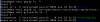
See screenshot for current permissions. The first one, 'session', is the one which is not working. The second one, 'php_sess', is working.sessions.png
 
Great, that did the trick
Code:
chown apache:psacln /var/lib/php/session
chmod -R 770 /var/lib/php/session
chcon -R system_u:object_r:httpd_sys_content_t:s0 /var/lib/php/session
Thanks a lot!
 
Status
Not open for further replies.
Back
Top