
 Facebook
 Twitter
I am using Plesk Obsidian in Windows Server 2012 R2 (Version 18.0.33 Update #1)
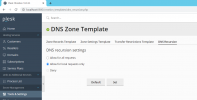
There are many outgoing DNS requests in performance monitor. I disabled recursion in DNS.exe - Advanced tab. But it didn't solve problem. As I know, Plesk manages DNS of server. I wanted to disable DNS recursion from Tools&Settings - DNS Template - DNS Recursion, but the Deny radio button is disabled so I can not deny DNS Recursion.
Screenshot: Screenshot
How can I disable DNS Recursion in Plesk Panel?
There are many outgoing DNS requests in performance monitor. I disabled recursion in DNS.exe - Advanced tab. But it didn't solve problem. As I know, Plesk manages DNS of server. I wanted to disable DNS recursion from Tools&Settings - DNS Template - DNS Recursion, but the Deny radio button is disabled so I can not deny DNS Recursion.
Screenshot: Screenshot
How can I disable DNS Recursion in Plesk Panel?


