• Debian 11 is approaching its end-of-life (vendor EOL date - August 31, 2026). Plesk Obsidian 18.0.80 will be the last release to support it.
    If you are running Plesk Obsidian on Debian 11, we recommend you upgrade those servers to Debian 12 using our dist-upgrade tool.
  • We plan to deprecate and remove the support for XML RPC protocol versions earlier than 1.6.9.1 in Plesk Obsidian 18.0.82. We strongly recommend that you update all existing integrations using earlier versions of the XML RPC protocol to comply with the version 1.6.9.1 specification.

Resolved DNSSEC and bind not start

nMLxTMJTZ

Regular Pleskian
Username:

TITLE

DNSSEC and bind not start

PRODUCT, VERSION, OPERATING SYSTEM, ARCHITECTURE

Debian 13

PROBLEM DESCRIPTION

If in my fresh installation of debian 13 activate DNSSEC for domain the service bind9 not start and give me policy error

"dnssec-policy doesn't match dnssec-policy config"

STEPS TO REPRODUCE

Enable DNSSEC

ACTUAL RESULT

when i try to start bind9 "dnssec-policy doesn't match dnssec-policy config"

EXPECTED RESULT

bind9 start without problem

ANY ADDITIONAL INFORMATION

(DID NOT ANSWER QUESTION)

YOUR EXPECTATIONS FROM PLESK SERVICE TEAM

Confirm bug
 
Thank you for the report, @nMLxTMJTZ . I opened an internal case with our engineers to further check the behavior. I will follow up with more details as soon as possible. Thank you for your patience in the meantime.
 
@nMLxTMJTZ , our engineers were unable to reproduce the issue on two test Debian 13 environments - with Plesk 18.0.76.4 & 18.0.77.0. Could you please provide more detailed steps to reproduce? Thank you in advance.
 
hi, i only enable DNS sec for a domain with debian 13 and after you try to reboot the server and you can see bind9 not start
 
Thank you for the update. However, even after a server reboot the issue does not occur on a test Debian 13 environment with DNSEC extension enabled for a domain name.
I would suggest opening a ticket with Plesk support for further investigation on your server. To sign-in and open a ticket please go to:
If you got your license from a reseller, your reseller is in charge of providing you with support. You can raise the inquiry with them and they can forward it to our team for further processing.

If the reseller does not provide support, here is an alternative to get support directly from Plesk:
 
Thank you. It appears that the missing step was running the dns repair utility, which results in the disappearance of the dnssec-policy records from the /etc/named.conf file The behavior was recognized as a bug identified with ID PPPM-15337. The suggested workaround (in case a DNS repair is needed) is to rrecreate DNSSEC signature for the domain (unsign/sign again).
 
Debian 13 Trixie

apt install systemd-resolved

sudo bash -c 'echo -e "nameserver 1.1.1.1\nnameserver 8.8.8.8" > /etc/resolv.conf'

reboot


Support email zertifikat ssl dnssec usw.
 
The fix is in progress and it very likely be released along with Plesk Obsidian 18.0.80. The only workaround (in case a DNS repair is needed) is to recreate DNSSEC signature for the domain (unsign/sign again).
 
The fix is in progress and it very likely be released along with Plesk Obsidian 18.0.80. The only workaround (in case a DNS repair is needed) is to recreate DNSSEC signature for the domain (unsign/sign again).
Is it fixed in the new update? It's getting tedious debugging DNSSEC every day.
 
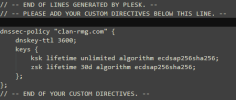
Where can I add custom directives for `named` in the panel? I have a temporary fix that I add manually, but it keeps getting overwritten by Plesk...

1786182587064.png
 
Back
Top