• The APS Catalog has been deprecated and removed from all Plesk Obsidian versions.
    Applications already installed from the APS Catalog will continue working. However, Plesk will no longer provide support for APS applications.
  • Please be aware: with the Plesk Obsidian 18.0.78 release, the support for the ngx_pagespeed.so module will be deprecated and removed from the sw-nginx package.

Resolved DNSSEC and bind not start

nMLxTMJTZ

Regular Pleskian
Username:

TITLE

DNSSEC and bind not start

PRODUCT, VERSION, OPERATING SYSTEM, ARCHITECTURE

Debian 13

PROBLEM DESCRIPTION

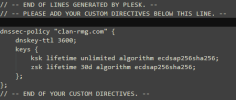
If in my fresh installation of debian 13 activate DNSSEC for domain the service bind9 not start and give me policy error

"dnssec-policy doesn't match dnssec-policy config"

STEPS TO REPRODUCE

Enable DNSSEC

ACTUAL RESULT

when i try to start bind9 "dnssec-policy doesn't match dnssec-policy config"

EXPECTED RESULT

bind9 start without problem

ANY ADDITIONAL INFORMATION

(DID NOT ANSWER QUESTION)

YOUR EXPECTATIONS FROM PLESK SERVICE TEAM

Confirm bug
 
Thank you for the report, @nMLxTMJTZ . I opened an internal case with our engineers to further check the behavior. I will follow up with more details as soon as possible. Thank you for your patience in the meantime.
 
@nMLxTMJTZ , our engineers were unable to reproduce the issue on two test Debian 13 environments - with Plesk 18.0.76.4 & 18.0.77.0. Could you please provide more detailed steps to reproduce? Thank you in advance.
 
Thank you for the update. However, even after a server reboot the issue does not occur on a test Debian 13 environment with DNSEC extension enabled for a domain name.
I would suggest opening a ticket with Plesk support for further investigation on your server. To sign-in and open a ticket please go to:
If you got your license from a reseller, your reseller is in charge of providing you with support. You can raise the inquiry with them and they can forward it to our team for further processing.

If the reseller does not provide support, here is an alternative to get support directly from Plesk:
 
Thank you. It appears that the missing step was running the dns repair utility, which results in the disappearance of the dnssec-policy records from the /etc/named.conf file The behavior was recognized as a bug identified with ID PPPM-15337. The suggested workaround (in case a DNS repair is needed) is to rrecreate DNSSEC signature for the domain (unsign/sign again).
 
Back
Top