Facebook
 Twitter

J.Wick
Regular Pleskian
TITLE:
ACTUAL RESULT:
Docker Input Field Disallows "=" Signs to Apply Config Variables
PRODUCT, VERSION, OPERATING SYSTEM, ARCHITECTURE:Plesk Onyx Version 17.8.11 Update #60, CentOS Linux 7.6.1810 (Core)
PROBLEM DESCRIPTION:When trying to apply setting options for a container, the "=" is disallowed preventing proper setup and launching of Docker containers producing the error...
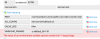
The value of an environment variable cannot contain the '=' (equal) sign.
STEPS TO REPRODUCE:The value of an environment variable cannot contain the '=' (equal) sign.
- Open Docker Container Settings (million12/varnish)
- Enter "-p default_ttl=120" into the VARNISHD_PARAMS variable
- Hit OK
- Error Message is produced.
Error.
The value of an environment variable cannot contain the '=' (equal) sign.
EXPECTED RESULT:The value of an environment variable cannot contain the '=' (equal) sign.
We should be able to place as many options as needed and have them saved successfully when clicking OK. Stop form validating the field.
ANY ADDITIONAL INFORMATION:Using the command line, I can set all these variables...but what the point of using Plesk then?
YOUR EXPECTATIONS FROM PLESK SERVICE TEAM:Confirm bug