
 Facebook
 Twitter
TITLE:
Docker Proxy - Turning off "Automatic port mapping" doesn't display "Manual mapping"
PRODUCT, VERSION, OPERATING SYSTEM, ARCHITECTURE:Plesk Onyx Version 17.5.3 Update #45
Server: Centos 7. Client: Fedora 26 x64, Windows 10 x64.
Firefox, Opera, Internet Explorer all without plugins/filters.
PROBLEM DESCRIPTION:Server: Centos 7. Client: Fedora 26 x64, Windows 10 x64.
Firefox, Opera, Internet Explorer all without plugins/filters.
Docker > Settings > Automatic port mapping - is turned off.
But it doesn't show option 'Manual mapping'
This is how it looks like after and before applying changes:
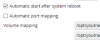
There is no option 'Manual mapping'
STEPS TO REPRODUCE:But it doesn't show option 'Manual mapping'
This is how it looks like after and before applying changes:
There is no option 'Manual mapping'
I've used youtransfer docker image. All other steps are standard.
ACTUAL RESULT:Field 'Manual mapping' doesn't show up.
EXPECTED RESULT:Field 'Manual mapping' should show up.
ANY ADDITIONAL INFORMATION:
YOUR EXPECTATIONS FROM PLESK SERVICE TEAM:Confirm bug


