• The APS Catalog has been deprecated and removed from all Plesk Obsidian versions.
    Applications already installed from the APS Catalog will continue working. However, Plesk will no longer provide support for APS applications.
  • Please be aware: with the Plesk Obsidian 18.0.78 release, the support for the ngx_pagespeed.so module will be deprecated and removed from the sw-nginx package.

Issue Dont have DNS Settings on my panel

onuruls

New Pleskian
Hey dear community, i try to get the SSL/TLS certificate from Let's Encrypt for my domain. For that i had to add DNS Record, but cant do it, bc i cant find DNS Settings anywhere in my Plesk, although I am logged into the system as admin. If that's a too old version for that, can you tell me how can i update it, or if someone else use the same Plesk version, can tell me, how can i update that DNS record?
Thank you!
Plesk Version: Plesk Obsidian 18.0.21
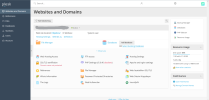
Screenshot 2022-03-01 172548.png
 
According to the left menu, you are logged in not as Plesk admin.
Perhaps DNS management is not allowed in subscription permissions. That's why you can't find it. Login as Plesk admin and check subscription permissions first.
 
Back
Top