Facebook
 Twitter
eslammahmoud
New Pleskian
Failed to copy content of database 'move3afs_wp'
Migration tools tried to perform operation in 1 attempts: Restoration of MySQL database failed. Most probable reason:
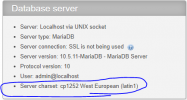
Target MySQL server does not contain necessary character set.
Most likely it is required to have at least MySQL 5.5 to restore such database.
Proposed solutions:
*) Obtain another target server which has OS providing appropriate MySQL server version.
For example, CentOS 6 provides MySQL 5.1 by default, while CentOS 7 provides MySQL 5.5 by default.
*) Connect another external MySQL server to the target server with appropriate MySQL version.
Configure that server as default, or specify it in service plan to which subscriptions are assigned to.
Remove migrated subscription from the target server and start migration once more.
*) Upgrade MySQL server on the target server to appropriate version, then run migration once more (no need to
remove subscriptions from target - just run migration over existing domains). For example, for CentOS you could use
packages provided by EPEL repositories. This way is not recommended for servers already running in production.
Here is the original error message reported by MySQL client when restoring the database:
ERROR 1273 (HY000) at line 25: Unknown collation: 'utf8mb4_unicode_520_ci'
How to solve the problem?
Migration tools tried to perform operation in 1 attempts: Restoration of MySQL database failed. Most probable reason:
Target MySQL server does not contain necessary character set.
Most likely it is required to have at least MySQL 5.5 to restore such database.
Proposed solutions:
*) Obtain another target server which has OS providing appropriate MySQL server version.
For example, CentOS 6 provides MySQL 5.1 by default, while CentOS 7 provides MySQL 5.5 by default.
*) Connect another external MySQL server to the target server with appropriate MySQL version.
Configure that server as default, or specify it in service plan to which subscriptions are assigned to.
Remove migrated subscription from the target server and start migration once more.
*) Upgrade MySQL server on the target server to appropriate version, then run migration once more (no need to
remove subscriptions from target - just run migration over existing domains). For example, for CentOS you could use
packages provided by EPEL repositories. This way is not recommended for servers already running in production.
Here is the original error message reported by MySQL client when restoring the database:
ERROR 1273 (HY000) at line 25: Unknown collation: 'utf8mb4_unicode_520_ci'
How to solve the problem?