• Debian 11 is approaching its end-of-life (vendor EOL date - August 31, 2026). Plesk Obsidian 18.0.80 will be the last release to support it.
    If you are running Plesk Obsidian on Debian 11, we recommend you upgrade those servers to Debian 12 using our dist-upgrade tool.
  • We plan to deprecate and remove the support for XML RPC protocol versions earlier than 1.6.9.1 in Plesk Obsidian 18.0.82. We strongly recommend that you update all existing integrations using earlier versions of the XML RPC protocol to comply with the version 1.6.9.1 specification.

Issue error in backup option

susan_jo

New Pleskian
I had been running scheduled backup. The disk space got full and the backup option redirects me to repair options. Now the disk space is normal however I am still getting the repair option.

i cannot perform schedule or manual backups.

I have tried to resolve by restarting plesk service, processes recommended in the redirect screen.
 
Could you please post a screenshot of "repair options". I am lost with this question, because I don't know what this is.
 
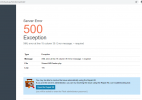
after I select the backup manager i get the below screen.1603009545248.png

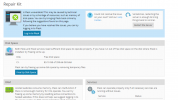
after opening the repair option i get 1603009648170.png

and this issue is only for 1 domain. i have multiple domains and in other domains these options are working fine.
 
Back
Top