• The APS Catalog has been deprecated and removed from all Plesk Obsidian versions.
    Applications already installed from the APS Catalog will continue working. However, Plesk will no longer provide support for APS applications.
  • Please be aware: with the Plesk Obsidian 18.0.78 release, the support for the ngx_pagespeed.so module will be deprecated and removed from the sw-nginx package.

Issue error in backup option

susan_jo

New Pleskian
I had been running scheduled backup. The disk space got full and the backup option redirects me to repair options. Now the disk space is normal however I am still getting the repair option.

i cannot perform schedule or manual backups.

I have tried to resolve by restarting plesk service, processes recommended in the redirect screen.
 
Could you please post a screenshot of "repair options". I am lost with this question, because I don't know what this is.
 
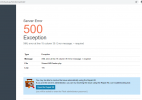
after I select the backup manager i get the below screen.1603009545248.png

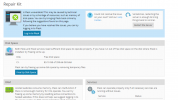
after opening the repair option i get 1603009648170.png

and this issue is only for 1 domain. i have multiple domains and in other domains these options are working fine.
 
Back
Top