Follow along with the video below to see how to install our site as a web app on your home screen.
Note: This feature may not be available in some browsers.
The APS Catalog has been deprecated and removed from all Plesk Obsidian versions. Applications already installed from the APS Catalog will continue working. However, Plesk will no longer provide support for APS applications.
Please be aware: with the Plesk Obsidian 18.0.78 release, the support for the ngx_pagespeed.so module will be deprecated and removed from the sw-nginx package.
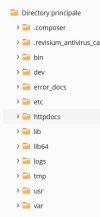
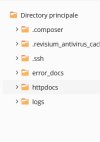
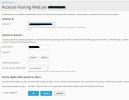
Those are Chrooted directories. Most likely created because chrooted shell access is selected for that particular domain. Go to Domains > example.com > Web Hosting Access. To see if the chrooted shell is selected.
Try changing it to 'chrooted' shell and back to 'Forbidden'.
Have you upgraded this server from Onyx?
I have one subscription with the same directories even shell is set to Forbidden'. But this subscription was set to chrooted in Onyx. Now even with the shell 'Forbidden', Directories are still there.