Question FTP Issues with NON Root user

madpugger

New Pleskian
Server operating system version
Obuntu 22.04.5 LTS
Plesk version and microupdate number
Obsidian 18.0.71
I am having problems logging in with non ROOT user for FTP.
I am using Coda 2 and Finder on macOS.

If I use the Mac that is on a static IP with access to Plesk, the login works with non root user. But when I try to use a different machine (at home or support etc.), the connection doesn't work.

FTP Port 21 is not firewall to a particular IP in ionos or in Plesk.

Any help appreciated!
 
Hi,
Do you have the passive ports opened in the firewall?
Bash:
grep -ir passive /etc/proftpd.*
/etc/proftpd.conf:PassivePorts xxxxx yyyyy
Bash:
iptables -S INPUT | grep xxxxx
-A INPUT -p tcp -m tcp --dport xxxxx:yyyyy -j ACCEPT

If they are not opened or you are using different passive ports than the ones opened in the firewall, you will have trouble connecting from computers that don't have public IP addresses.
 
Hello everyone, I’m still having the same problem.
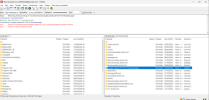
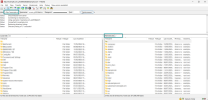
Non-root users have access to the entire server; this is extremely dangerous.
Despite all attempts to adjust the settings, non-root users still have the whole server at their disposal.
Why?
 
Can you please confirm the method used to connect to the server? FTP/S access is chrooted to the webspace and for additional FTP users to the designated folder within the webspace when creating them.
 
Can you please confirm the method used to connect to the server? FTP/S access is chrooted to the webspace and for additional FTP users to the designated folder within the webspace when creating them.
1 I am on the relevant subdomain in Plesk.
I go to FTP.
I create a user, specifying the desired folder.
When I set up FileZilla, I have full access to the server. with this user
 
Interesting.
Can you DM me the output of
Bash:
grep <ftp_user> /etc/passwd
?

What OS are you running Plesk on?
 
We have exactly the same issue! All FTP users of website have access to the full server! It's really a critical security issue. We run into AlmaLinux 8.10 (Cerulean Leopard)
And we are in 18.0.79 update 1 so the bug is on the last update too!
 

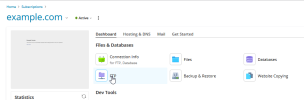
FTPs:​

1783521013793.png
1783521037118.png

1783521054872.png
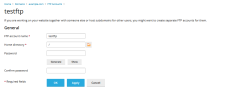
testftp will have access to the entire webspace. The webspace is at /var/www/vhosts/example.com/
1783521154168.png

You can change the testftp user home directory to any subdirectory of /var/www/vhosts/example.com/

SFTP​

Only the main FTP user can use SFTP. It uses the SSH server on port 22 (default) instead of the FTP server on port 21.
Depending on the SSH access type, the logged in user will see the entire disk (/bin/sh, /bin/bash, /usr/bin/sh, /usr/bin/bash, /usr/bin/tmux, /bin/tmux) or just the webspace, like the FTP connection, if SSH access type is /bin/bash (chrooted). SSH access type Forbidden will not allow SFTP connections.
1783521698690.png
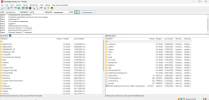
In this case, you can browse the entire Linux file system, but you can't access other webspace.
1783521866925.png

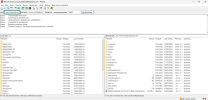
If the system user has SSH access type /bin/bash (chrooted) the FTP client will show this:
1783521980689.png

However, this / is in fact the webspace, just like in the FTPs case, which /var/www/vhosts/example.com/
 
Back
Top