• The new Python extension is now available. It allows customers to deploy and manage WSGI-based Python applications on their websites directly from Plesk.
  • The Plesk Mobile apps for iOS and Android and the Plesk Mobile Center extension have been deprecated, and are no longer available for new installations. In Plesk Obsidian 18.0.84, the Plesk Mobile Center extension will be removed from servers during the upgrade, and the Plesk Mobile apps will lose their server management features.
  • The Social Login extension has been deprecated and will be removed in Plesk Obsidian 18.0.84. After that, it will no longer be possible to log in to Plesk with a Google, Facebook, GitHub account, or with a passkey. Plesk usernames and passwords, as well as logging in with a WebPros Account, are not affected.

Question Google PageSpeed Insights imroving

kojot

Regular Pleskian
Hello,
I just installed this Plesk's extension and started to follow instructions. And for now I improved few things.
It is strange, extension showing Result: 79 / 100, but Google Page insights site 68/100, but that is not my question.

I'm reading this guide Google PageSpeed Insights - How to optimize your site to rank higher - Plesk and it is very useful.

I have problem for now with "Leverage browser caching", and I added this in "Additional nginx directives",
Code:
location ~* \.(?:ico|css|js|gif|jpe?g|png|svg|woff)$ {
    expires 30d;
    add_header Pragma public;
    add_header Cache-Control "public";
}

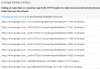
and most of the reported links are fixed. But some links for google maps are still there
upload_2017-10-20_16-6-13.png


How to solve that?

Thanks
 
Hello,
I just installed this Plesk's extension and started to follow instructions. And for now I improved few things.
It is strange, extension showing Result: 79 / 100, but Google Page insights site 68/100, but that is not my question.

I'm reading this guide Google PageSpeed Insights - How to optimize your site to rank higher - Plesk and it is very useful.

I have problem for now with "Leverage browser caching", and I added this in "Additional nginx directives",
Code:
location ~* \.(?:ico|css|js|gif|jpe?g|png|svg|woff)$ {
    expires 30d;
    add_header Pragma public;
    add_header Cache-Control "public";
}

and most of the reported links are fixed. But some links for google maps are still there

View attachment 13652


How to solve that?

Thanks

Hello @CoyoteKG , you can even allow browser cache for all static files :
Code:
# Cache static files
location ~* \.(ogg|ogv|svg|svgz|eot|otf|woff|mp4|ttf|css|rss|atom|js|jpg|jpeg|gif|png|ico|zip|tgz|gz|rar|bz2|doc|xls|exe|ppt|tar|mid|midi|wav|bmp|rtf|swf|webp)$ {
  add_header "Access-Control-Allow-Origin" "*";
  access_log off;
  log_not_found off;
  expires max;
}

But you can only change browser cache duration for assets loaded from your domain. For external assests, there is no way to change it.
 
Hi @virtubox, and thank you for respond.

I guess that is the problem because google map is external.
So there is no chance to improve result to 100/100 if we have google map on homepage.
 
Back
Top