
 Facebook
 Twitter
Nicson
New Pleskian
- Server operating system version
- Debian 6.1.140-1 x86_64
- Plesk version and microupdate number
- Version 18.0.70
Monitoring & Grafana Extension doesnt work when a different Plesk Interface Port is used.
After hours of try & debug...
When the Server use 8443/8880 Ports Grafana works fine.
If the Ports where changed like (How to change the ports for the Plesk interface on Linux? - Support Cases from Plesk Knowledge Base), i get following error:
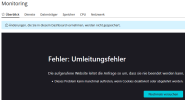
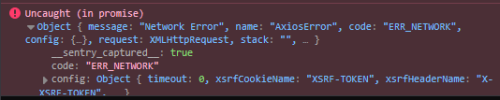
After return setup to 8443/8880 Ports it works again.
I found /etc/grafana/grafana.ini but dont know how to fix the Problem, theres another Port "3030" defined...
Maybe someone knows a solution?
After hours of try & debug...
When the Server use 8443/8880 Ports Grafana works fine.
If the Ports where changed like (How to change the ports for the Plesk interface on Linux? - Support Cases from Plesk Knowledge Base), i get following error:
After return setup to 8443/8880 Ports it works again.
I found /etc/grafana/grafana.ini but dont know how to fix the Problem, theres another Port "3030" defined...
Maybe someone knows a solution?


