
 Facebook
 Twitter
Username:
TITLE
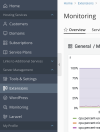
[GUI] - When you're on the monitoring page, the "Extensions" tab in the sidebar is highlighted
PRODUCT, VERSION, OPERATING SYSTEM, ARCHITECTURE
Plesk Obsidian Version 18.0.50 Update #2
AlmaLinux 8.7
PROBLEM DESCRIPTION
When you're on the monitoring page, the "Extensions" tab in the sidebar is highlighted:
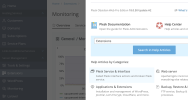
When you're on the monitoring page and click on the Help icon on the top right of the screen, the suggested search keyword is "Extensions":
STEPS TO REPRODUCE
ACTUAL RESULT
When you're on the monitoring page, the "Extensions" tab in the sidebar is highlighted.
When you're on the monitoring page and click on the Help icon on the top right of the screen, the suggested search keyword is "Extensions"
EXPECTED RESULT
The "Monitoring" tab in the sidebar should be highlighted when you're on the monitoring page.
When you're on the monitoring page and click on the Help icon on the top right of the screen, the suggested search keyword should be "Monitoring"
ANY ADDITIONAL INFORMATION
(DID NOT ANSWER QUESTION)
YOUR EXPECTATIONS FROM PLESK SERVICE TEAM
Confirm bug
TITLE
[GUI] - When you're on the monitoring page, the "Extensions" tab in the sidebar is highlighted
PRODUCT, VERSION, OPERATING SYSTEM, ARCHITECTURE
Plesk Obsidian Version 18.0.50 Update #2
AlmaLinux 8.7
PROBLEM DESCRIPTION
When you're on the monitoring page, the "Extensions" tab in the sidebar is highlighted:
When you're on the monitoring page and click on the Help icon on the top right of the screen, the suggested search keyword is "Extensions":
STEPS TO REPRODUCE
- Log in on Plesk
- Click on "Monitoring" in the left sidebar.
- The Extensions menu item is highlighted.
- On the Monitoring page, click on the Help icon on the top right of the screen. The right sidebar shows the suggested search keyword "Extensions"
ACTUAL RESULT
When you're on the monitoring page, the "Extensions" tab in the sidebar is highlighted.
When you're on the monitoring page and click on the Help icon on the top right of the screen, the suggested search keyword is "Extensions"
EXPECTED RESULT
The "Monitoring" tab in the sidebar should be highlighted when you're on the monitoring page.
When you're on the monitoring page and click on the Help icon on the top right of the screen, the suggested search keyword should be "Monitoring"
ANY ADDITIONAL INFORMATION
(DID NOT ANSWER QUESTION)
YOUR EXPECTATIONS FROM PLESK SERVICE TEAM
Confirm bug
