Follow along with the video below to see how to install our site as a web app on your home screen.
Note: This feature may not be available in some browsers.
We value your experience with Plesk during 2025 Plesk strives to perform even better in 2026. To help us improve further, please answer a few questions about your experience with Plesk Obsidian 2025. Please take this short survey: https://survey.webpros.com/
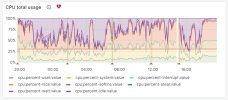
Based on the graph, I think we can only say something is utilizing the CPU. If you change the timeframe to a week or a month, it could be possible to understand when exactly it was started. Based on this graph, it is hard to say what exactly the reason is here. At least, the graph says that need to look a little bit deeper to understand what generates the usage: is it legitimate usage and maybe need to upgrade the server hardware? is some website poorly written? is there some virus generating usage?
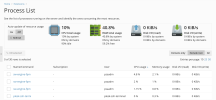
With the Monitoring extension, you can check all rest tabs to find more clues on what could generate CPU usage (the "Services" tab).
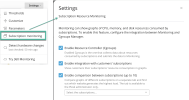
Also with the Monitoring extension (the "Settings" button on the Monitoring extension page), if your system supports cgroups feature, it is possible to start monitoring subscriptions usage. If the issue with a subscription, it could help to find out which one,