• Debian 11 is approaching its end-of-life (vendor EOL date - August 31, 2026). Plesk Obsidian 18.0.80 will be the last release to support it.
    If you are running Plesk Obsidian on Debian 11, we recommend you upgrade those servers to Debian 12 using our dist-upgrade tool.
  • We plan to deprecate and remove the support for XML RPC protocol versions earlier than 1.6.9.1 in Plesk Obsidian 18.0.82. We strongly recommend that you update all existing integrations using earlier versions of the XML RPC protocol to comply with the version 1.6.9.1 specification.

How can I get "PHP5.4 support" back on Paralles Plesk Panel components list?

When I upgraded to PLESK 11.5, "Install or Upgrade Parallels Products" page https://*.*.*.*/select_components.html
has option "PHP5.4 support" in "Plesk hosting features" on Paralles Plesk Panel components list.

After couple of time test install and change the PHP interpreter versions on above page and use atomic repo, "PHP5.4 support" has been gone.

Then now it is "PHP5 support" which is older PHP version like PHP5.2.

How can I get "PHP5.4 support" back?

Thank you.

koichi.
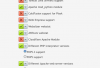
 

Attachments

  • Paralles Plesk Panel components list.png
    Paralles Plesk Panel components list.png
    51.3 KB · Views: 11
"PHP5.4 support" was never there.

"PHP5 support" is your OS (or thirdparty repo like atomic) vendor PHP packages. "PHP5.3 support" is php53-* packages from you OS vendor repos.

P.S.: it's not related to your question, but you should really consider moving to a newer OS distribution.
 
"PHP5.4 support" was never there.

"PHP5 support" is your OS (or thirdparty repo like atomic) vendor PHP packages. "PHP5.3 support" is php53-* packages from you OS vendor repos.

P.S.: it's not related to your question, but you should really consider moving to a newer OS distribution.


Thank you for your suggestion of moving to new OS distribution.
Uhmm, Now I have already actived atomic repo, but I can not see the PHP5.4 on the Paralles Plesk Panel components list.
How can I geti it on the list...?
 
It will always be named "PHP5 support". It will install the latest available php packages. Be warned though that switching from "PHP5.3 support" to "PHP5 support" doesn't always go very smooth.
 
It will always be named "PHP5 support". It will install the latest available php packages. Be warned though that switching from "PHP5.3 support" to "PHP5 support" doesn't always go very smooth.

Thank you, Nikolay.
When I installed with "PHP5 support" then I checked by "php -v" was older than 5.3, I don't have clear memory it was 5.1 or 5.2, why this was happen?
 
Back
Top