• Inviting everyone who uses WordPress management tools in Plesk
    The Plesk team is conducting a 60-minute research session that includes an interview and a moderated usability test.
    To participate, please use this link .
    Your experience will help shape product decisions and ensure the tools better support real-world use cases.

How do I change the system IP?

JP Kelly

Regular Pleskian
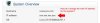
In System Overview there is an IP listed. That IP is a shared IP. I want to change it to one of the dedicated IPs I have available on my system. I do not see any way to change this IP.

See attached file for an image of the Control panel area with the IP showing.
 

Attachments

  • sysIP.jpg
    sysIP.jpg
    6.2 KB · Views: 4
Does the Dedicated IP appear in your list of IPs in Tools & Settings > IP Addresses ? If not then you'll need to add it.

You then need to open the Subscription for the domain (i.e. either type the domain in the search box at the top right of the page, or just find it via the Subscriptions link in the main menu on the left).

Next, click on the Change Hosting Settings button you'll see in the top menu for the Subscription (Change Plan | Custoomise | **Change Hosting Settings** | Suspend | Change Subscriber | Remove)

In there you'll see a drop down that will allow you to select from *unallocated* Dedicated IPs.

Note that all domains within the Subscription will use that IP.

In doing all this, in a way, the Dedicated IP has been allocated for the sole use of the Customer that the Subscription belongs to. What this means is that if you add a new Subscription to that Customer, you'll find that you are able to pick the Dedicated IP you previously allocated to the first Subscription (or one of your Shared IPs if you prefer) for use by the new Subscription that you are adding to the Customer.
 
oh. Sorry. You wanted to change your SYSTEM IP address, not the ip allocated to a domain.
I think this has been answered in a different post?
 
Back
Top