• The APS Catalog has been deprecated and removed from all Plesk Obsidian versions.
    Applications already installed from the APS Catalog will continue working. However, Plesk will no longer provide support for APS applications.
  • Please be aware: with the Plesk Obsidian 18.0.78 release, the support for the ngx_pagespeed.so module will be deprecated and removed from the sw-nginx package.

Question How I clear plesk php83 folder in the tmp

eronardiaras

Basic Pleskian
Server operating system version
AlmaLinux 9.7
Plesk version and microupdate number
18.0.77
I found a folder in my tmp directory that is taking up a lot of space.

Why is this one folder here with such a large space requirement?

How can I safely remove it?

/tmp/systemd-private-5255d67d0f424807ba3c0fd4ec899e16-plesk-php83-fpm.service-AR6eIR
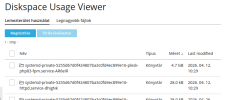
php83tmp.png
 
Hi, @eronardiaras . You can find details on how clean up the files here:

You can also adjust the frequency of the file rotation - (Solution 1) in this article:


Thanks, it's solved (change PrivateTmp value to false).

But. It's interesting that it's enabled (PrivateTmp=true) in the other versions (php fpm 8.0, 8.3, 8.4), but that doesn't take up space in the tmp folder. Additionaly, there are more websites running under the other versions (php fpm 8.0, 8.3, 8.4).

(By the way, this all started about (~2 weeks ago) when the server went down for some reason. The folder in the tmp folder was also created around that time and I've noticed since then that it's running out of space for no reason.)
 
I can't really say what is causing these temporary files to be generated. It could be due to PHP extensions, PHP sessions, etc. What you can do is to further examine the files within the folder corresponding to PHP 8.3.
 
I can't really say what is causing these temporary files to be generated. It could be due to PHP extensions, PHP sessions, etc. What you can do is to further examine the files within the folder corresponding to PHP 8.3.
Now a lot of png files are being put in the "/tmp/" folder. (after I changed PrivateTmp value to false)
(and not in the "/tmp/systemd-private-5255d67d0f424807ba3c0fd4ec899e16-plesk-php83-fpm.service-AR6eIR" folder)

I checked and they are all linked to one wordpress website:
#ls -l
-rw-r--r--. 1 okaaa psacln 3003 Apr 29 21:04 opt_job_fe58fe7c0fc2491dba7ad9e99bb5097c-IWtlmp.png
-rw-r--r--. 1 okaaa psacln 3003 Apr 29 20:51 opt_job_fe58fe7c0fc2491dba7ad9e99bb5097c-IXJMK6.png
-rw-r--r--. 1 okaaa psacln 3003 Apr 29 20:59 opt_job_fe58fe7c0fc2491dba7ad9e99bb5097c-Mal6nT.png
-rw-r--r--. 1 okaaa psacln 3003 Apr 29 20:58 opt_job_fe58fe7c0fc2491dba7ad9e99bb5097c-O2zTlS.png

And lot of folders with name: "spiot*".

If I delete them, they are back there very quickly.

Imunify does not indicate a virus (I haven't checked with anything else yet).
 
Hopefully the issue has been solved.

The website owner disabled a plugin: wp-rocket
And changed the settings for a plugin (hellopack-shortpixel plugin).

So the image files in the tmp folder were no longer being generated again.

It was a wordpress plugin the problem, but it is interesting that it can just fill the tmp folder to such an extent and if the issue does not appear, I can believe that the storage was simply used with normal usage.
 
Back
Top