Follow along with the video below to see how to install our site as a web app on your home screen.
Note: This feature may not be available in some browsers.
Debian 11 is approaching its end-of-life (vendor EOL date - August 31, 2026). Plesk Obsidian 18.0.80 will be the last release to support it.
If you are running Plesk Obsidian on Debian 11, we recommend you upgrade those servers to Debian 12 using our dist-upgrade tool.
We plan to deprecate and remove the support for XML RPC protocol versions earlier than 1.6.9.1 in Plesk Obsidian 18.0.82. We strongly recommend that you update all existing integrations using earlier versions of the XML RPC protocol to comply with the version 1.6.9.1 specification.
PHP 8.3.3 (cli) (built: Feb 16 2024 09:57:19) (NTS)
Copyright (c) The PHP Group
Zend Engine v4.3.3, Copyright (c) Zend Technologies
with Zend OPcache v8.3.3, Copyright (c), by Zend Technologies
Now with the following command should be possible to check if pcntl is installed and active
Code:
# /opt/plesk/php/8.3/bin/php -m | grep pcntl
The Output is:
Code:
pcntl
written in a red row.
This should mean the component is active and installed?
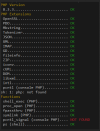
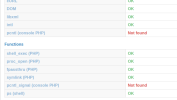
But FreeScout say that is not found.
I check in the php.ini and there is no extnesion line like:
Code:
extension=pcntl
If I add this line I get cron error message:
Code:
PHP Warning: PHP Startup: Unable to load dynamic library 'pcntl' (tried: /opt/plesk/php/8.3/lib/php/modules/pcntl (/opt/plesk/php/8.3/lib/php/modules/pcntl: cannot open shared object file: No such file or directory), /opt/plesk/php/8.3/lib/php/modules/pcntl.so (/opt/plesk/php/8.3/lib/php/modules/pcntl.so: cannot open shared object file: No such file or directory)) in Unknown on line 0
I'm still looking how to resolve the issue showed by FreeScout
Well I tried to adapt the guide located here for / to the pcntl support but if I add the extension=pcntl in the php.ini after this procedure now I get a shorter error: PHP Warning: Module "pcntl" is already loaded in Unknown on line 0
Removed the lineextension=pcntl from the php.ini
Freescout still showing Not found as in the screen above.
I will try to ask again also to Freescout why.
Some details: PHP version: 8.3 FreeScout version: 1.8.120 Database: MySQL Are you using CloudFlare: Just the name server but not using Cloudflare proxy If you need know the version of the Workflow ...