
 Facebook
 Twitter
Hi everyone,
We have set the following settings in the panel.ini:
(Hiding Plesk Promos)
However, we still get the following ad on the login page of Plesk (when accessing it from a mobile device):
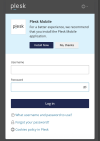
Is it possible to disable it, and if so, how?
Thank you.
We have set the following settings in the panel.ini:
Code:
[promos]
enabled = off
[aps]
serverAppsPromoEnabled = offHowever, we still get the following ad on the login page of Plesk (when accessing it from a mobile device):
Is it possible to disable it, and if so, how?
Thank you.


