• We value your experience with Plesk during 2026
    Please help us understand which Plesk features made your work easier this year, what is still missing and how AI should help you in Plesk ?
    Take this short 5-minutes survey. Your answers go straight into the Plesk roadmap for 2027.

How to use php.ini .htaccess register_globals on a per-site basis?

D

Data@

Guest
I'm using Plesk for Windows/IIS with register_globals turned off by default in the php.ini.

Now a client of mine needs register_globals to be on for his site. I do not want to turn register_globals on by default in php.ini as this will put all other sites at risk.

On linux this could be easily done with .htaccess, but that doesnt work for Windows and IIS.

How do i enable register_globals for just one website?
 
Silence1,

On your server:

Start > Run > type "regedit" (without quotes)
Then find the registry branch HKLM\SOFTWARE\PHP\Per Directory Values\C\Inetpub\vhosts\domain.com where domain.com should be replaced with the real domain name on which you need to set register_globals to "On" and change this value manually.

Hope this will help.
 
register_globals

Works Like a charm...

For registry "unknowers":

Start - Run - Regedit - go to "HKLM\SOFTWARE\PHP\Per Directory Values\".

Then create keys (If you site folder is default "C:\Inetpub\vhosts\domain.com":
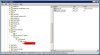
"C" - "Inetpub" - "vhosts" - "domain.com" - then add string value "register_globals" and set string "on".

Image is attached to message.
 

Attachments

  • php settings register_globals.jpg
    php settings register_globals.jpg
    80.4 KB · Views: 361
This Solution is not working for me on Windows 2003 Server x64 with Plesk 8.2

the Registy is:

HKEY_LOCAL_MACHINE > SOFTWARE > Wow6432Node > PHP > Per Directory Values > C > Inetpub > vhosts > domain.com
 
Back
Top