• Debian 11 is approaching its end-of-life (vendor EOL date - August 31, 2026). Plesk Obsidian 18.0.80 will be the last release to support it.
    If you are running Plesk Obsidian on Debian 11, we recommend you upgrade those servers to Debian 12 using our dist-upgrade tool.
  • We plan to deprecate and remove the support for XML RPC protocol versions earlier than 1.6.9.1 in Plesk Obsidian 18.0.82. We strongly recommend that you update all existing integrations using earlier versions of the XML RPC protocol to comply with the version 1.6.9.1 specification.

How to use php.ini .htaccess register_globals on a per-site basis?

D

Data@

Guest
I'm using Plesk for Windows/IIS with register_globals turned off by default in the php.ini.

Now a client of mine needs register_globals to be on for his site. I do not want to turn register_globals on by default in php.ini as this will put all other sites at risk.

On linux this could be easily done with .htaccess, but that doesnt work for Windows and IIS.

How do i enable register_globals for just one website?
 
Silence1,

On your server:

Start > Run > type "regedit" (without quotes)
Then find the registry branch HKLM\SOFTWARE\PHP\Per Directory Values\C\Inetpub\vhosts\domain.com where domain.com should be replaced with the real domain name on which you need to set register_globals to "On" and change this value manually.

Hope this will help.
 
register_globals

Works Like a charm...

For registry "unknowers":

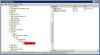
Start - Run - Regedit - go to "HKLM\SOFTWARE\PHP\Per Directory Values\".

Then create keys (If you site folder is default "C:\Inetpub\vhosts\domain.com":
"C" - "Inetpub" - "vhosts" - "domain.com" - then add string value "register_globals" and set string "on".

Image is attached to message.
 

Attachments

  • php settings register_globals.jpg
    php settings register_globals.jpg
    80.4 KB · Views: 361
This Solution is not working for me on Windows 2003 Server x64 with Plesk 8.2

the Registy is:

HKEY_LOCAL_MACHINE > SOFTWARE > Wow6432Node > PHP > Per Directory Values > C > Inetpub > vhosts > domain.com
 
Back
Top