• Halloween is coming! To celebrate the occasion, we dusted off a couple of old skins, and even created a brand new one (Pixel).
    To get into the festive spirit, install the Skins extension.
  • The new Python extension is now available. It allows customers to deploy and manage WSGI-based Python applications on their websites directly from Plesk.
  • The Plesk Mobile apps for iOS and Android and the Plesk Mobile Center extension have been deprecated, and are no longer available for new installations. In Plesk Obsidian 18.0.84, the Plesk Mobile Center extension will be removed from servers during the upgrade, and the Plesk Mobile apps will lose their server management features.
  • The Social Login extension has been deprecated and will be removed in Plesk Obsidian 18.0.84. After that, it will no longer be possible to log in to Plesk with a Google, Facebook, GitHub account, or with a passkey. Plesk usernames and passwords, as well as logging in with a WebPros Account, are not affected.

How to use php.ini .htaccess register_globals on a per-site basis?

D

Data@

Guest
I'm using Plesk for Windows/IIS with register_globals turned off by default in the php.ini.

Now a client of mine needs register_globals to be on for his site. I do not want to turn register_globals on by default in php.ini as this will put all other sites at risk.

On linux this could be easily done with .htaccess, but that doesnt work for Windows and IIS.

How do i enable register_globals for just one website?
 
Silence1,

On your server:

Start > Run > type "regedit" (without quotes)
Then find the registry branch HKLM\SOFTWARE\PHP\Per Directory Values\C\Inetpub\vhosts\domain.com where domain.com should be replaced with the real domain name on which you need to set register_globals to "On" and change this value manually.

Hope this will help.
 
register_globals

Works Like a charm...

For registry "unknowers":

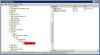
Start - Run - Regedit - go to "HKLM\SOFTWARE\PHP\Per Directory Values\".

Then create keys (If you site folder is default "C:\Inetpub\vhosts\domain.com":
"C" - "Inetpub" - "vhosts" - "domain.com" - then add string value "register_globals" and set string "on".

Image is attached to message.
 

Attachments

  • php settings register_globals.jpg
    php settings register_globals.jpg
    80.4 KB · Views: 361
This Solution is not working for me on Windows 2003 Server x64 with Plesk 8.2

the Registy is:

HKEY_LOCAL_MACHINE > SOFTWARE > Wow6432Node > PHP > Per Directory Values > C > Inetpub > vhosts > domain.com
 
Back
Top