• The new Python extension is now available. It allows customers to deploy and manage WSGI-based Python applications on their websites directly from Plesk.
  • Debian 11 has reached its end-of-life (vendor EOL date - August 31, 2026). Plesk Obsidian 18.0.81 is the last release to support it.
    If you are running Plesk Obsidian on Debian 11, we recommend you upgrade those servers to Debian 12 using our dist-upgrade tool.
  • We plan to deprecate and remove the support for XML RPC protocol versions earlier than 1.6.9.1 in Plesk Obsidian 18.0.82. We strongly recommend that you update all existing integrations using earlier versions of the XML RPC protocol to comply with the version 1.6.9.1 specification.

Issue https port for plesk isn't secure

Jude Lobo

New Pleskian
Is there a way to secure Plesk's :8443 port?. I'm using the web-host edition of Plesk so I don't know if this is the right place to even ask this question, but when I go to my lets encrypt extension, I am not getting the option of Securing Plesk. I'm only getting the option of securing webmail on this domain. Is there any way of securing the control panel/Plesk?
 
Hi Jude Lobo,

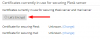
pls. go to: => Home > Tools & Settings > SSL/TLS Certificates

and see the option:


If you desire more informations, pls. visit for example the official Plesk documentation:


I don't have the tools and settings option in home, only the SSL/TLS certificates option and when I go into that I can't see the options in the screenshot you provided.

Again I don't have the plesk onyx, i am using the web-hosting edition of plesk.
 
Again I don't have the plesk onyx, i am using the web-hosting edition of plesk.
Web Hosting edition is just one of Plesk editions, but Onyx is name of Plesk version, therefore Web Hosting edition maybe Web Hosting edition of Plesk Onyx :)
I don't have the tools and settings option in home, only the SSL/TLS certificates option
Tell me please, did you enter to the Plesk as an admin, or with your client's login credentials?
 
Web Hosting edition is just one of Plesk editions, but Onyx is name of Plesk version, therefore Web Hosting edition maybe Web Hosting edition of Plesk Onyx :)

Tell me please, did you enter to the Plesk as an admin, or with your client's login credentials?

I logged in with my client credentials, I don't currently have the admin credentials currently, is there a default user/pass for the admin login? or will I have to ask the people that i purchased my domain from?
 
I logged in with my client credentials, I don't currently have the admin credentials currently, is there a default user/pass for the admin login? or will I have to ask the people that i purchased my domain from?
First of all you need to install free Plesk Let's Encrypt extension as admin. I think that owner of your Plesk server should have Plesk admin credentials. Try to ask him.
 
Back
Top