Facebook
 Twitter
Adam Alrajjoub
New Pleskian
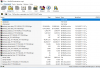
I downloaded the Backup from the Plisk Control Panel but the file that was downloaded on the computer is an extension of mht!


How do I restore the Backup?
How to be the way ?? Do I upload the file to the server ?? Then what then ?? What steps should I do to restore Backup?
Thanks in advance for help
How do I restore the Backup?
How to be the way ?? Do I upload the file to the server ?? Then what then ?? What steps should I do to restore Backup?
Thanks in advance for help