Facebook
 Twitter
Fastamir
New Pleskian
Hey All
Hope everyone is okay.
We have conversed before where you have provided some guidance; thank you for that.
Reaching out to see if you can shed any light, also reached out to Raul as he has helped in the past as well
Got a client on domain <redacted>
Email address <redacted>
He recently purchased a new phone and a new laptop.
Issue:
When I create the email address on his phone, it works fine (and he already has this email address on his work PC)
But when I try it on his new LENOVO laptop - using exactly ALL the same settings (incoming server, outgoing server, ports, username, password) it is failing in the creation of the email address; I have done this many times before but only face issues with Outlook 365
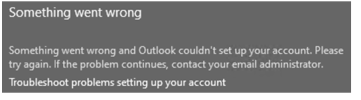
I get a message saying that cannot create account, please see service provider.
I googled the error and it says to remove autodiscover for the domain in Plesk.
ISSUE
When adding an Outlook account for Microsoft 365 with a custom domain or an Outlook.com account with a personalized email address, you receive the following error:
CAUSE
This issue occurs because the Autodiscover process that's used by Outlook receives an unexpected result from a third-party web server when it performs the root domain lookup. For example, Outlook may receive a result such as https://<RootDomain>/AutoDiscover/AutoDiscover.xml.
Typically, the root domain lookup would fail in this case, and Outlook would perform an Autodiscover lookup against https://AutoDiscover.<RootDomain>/AutoDiscover/AutoDiscover.xml. However, because Outlook receives a successful Autodiscover response from the root domain lookup, Outlook tries to authenticate against the advertised protocols such as POP and IMAP, and the operation fails.
SOLUTION
Contact your web service provider or the web hosting provider of your domain website and make sure that the web server is not responding to Autodiscover requests.
After doing this it is still the same, cannot create account on this laptop.
I know it is something to do with Outlook 365 but cannot get any joy as to the solution from anywhere.
Can you offer any advice, as user is a very good friend of mine.
Thanks in advance
Amir
Hope everyone is okay.
We have conversed before where you have provided some guidance; thank you for that.
Reaching out to see if you can shed any light, also reached out to Raul as he has helped in the past as well
Got a client on domain <redacted>
Email address <redacted>
He recently purchased a new phone and a new laptop.
Issue:
When I create the email address on his phone, it works fine (and he already has this email address on his work PC)
But when I try it on his new LENOVO laptop - using exactly ALL the same settings (incoming server, outgoing server, ports, username, password) it is failing in the creation of the email address; I have done this many times before but only face issues with Outlook 365
I get a message saying that cannot create account, please see service provider.
I googled the error and it says to remove autodiscover for the domain in Plesk.
ISSUE
When adding an Outlook account for Microsoft 365 with a custom domain or an Outlook.com account with a personalized email address, you receive the following error:
CAUSE
This issue occurs because the Autodiscover process that's used by Outlook receives an unexpected result from a third-party web server when it performs the root domain lookup. For example, Outlook may receive a result such as https://<RootDomain>/AutoDiscover/AutoDiscover.xml.
Typically, the root domain lookup would fail in this case, and Outlook would perform an Autodiscover lookup against https://AutoDiscover.<RootDomain>/AutoDiscover/AutoDiscover.xml. However, because Outlook receives a successful Autodiscover response from the root domain lookup, Outlook tries to authenticate against the advertised protocols such as POP and IMAP, and the operation fails.
SOLUTION
Contact your web service provider or the web hosting provider of your domain website and make sure that the web server is not responding to Autodiscover requests.
After doing this it is still the same, cannot create account on this laptop.
I know it is something to do with Outlook 365 but cannot get any joy as to the solution from anywhere.
Can you offer any advice, as user is a very good friend of mine.
Thanks in advance
Amir
Last edited by a moderator: