
 Facebook
 Twitter
- Server operating system version
- Ubuntu 20.04.6 LTS
- Plesk version and microupdate number
- Version 18.0.54 Update #4
Hi,
I have imported a WP instance into plesk and connetced it with wp toolkit.
So far so good, everything runs as expected, except the login button via plesk.
The URL adress is empty, and I can't find the matching plesk db to set it manually.
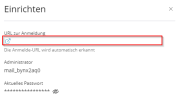
Any ideas or the table where I could insert it manually?
I have imported a WP instance into plesk and connetced it with wp toolkit.
So far so good, everything runs as expected, except the login button via plesk.
The URL adress is empty, and I can't find the matching plesk db to set it manually.
Any ideas or the table where I could insert it manually?

