
 Facebook
 Twitter
FlyingParrot
Basic Pleskian
- Server operating system version
- Ubuntu 22.04.2 LTS
- Plesk version and microupdate number
- Plesk Obsidian 18.0.53 Update #2
Hey,I'm trying to call a python script via PHP in my web app, but I need additional python packages. How do I install them?
I found this article (https://support.plesk.com/hc/en-us/articles/12377824001943#) which worked fine, "Python support" has been added to the hosting-parameters list and is now enabled on my subdomain:
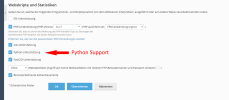
After that I searched on the internet about how to install packages, for example cv2 which is required in my Python script. But I couldn't find any tab or other option anywhere that allowes me to install packages. How do I do this?
Thank you.
I found this article (https://support.plesk.com/hc/en-us/articles/12377824001943#) which worked fine, "Python support" has been added to the hosting-parameters list and is now enabled on my subdomain:
After that I searched on the internet about how to install packages, for example cv2 which is required in my Python script. But I couldn't find any tab or other option anywhere that allowes me to install packages. How do I do this?
Thank you.


