• The APS Catalog has been deprecated and removed from all Plesk Obsidian versions.
    Applications already installed from the APS Catalog will continue working. However, Plesk will no longer provide support for APS applications.
  • Please be aware: with the Plesk Obsidian 18.0.78 release, the support for the ngx_pagespeed.so module will be deprecated and removed from the sw-nginx package.

Question Install Redis with docker on a centos 7 server

KlausZ

Basic Pleskian
Server operating system version
CentOS 7.9.2009
Plesk version and microupdate number
18.0.43
Hi,
i want to install redis on a centos 7 server with docker. I follow this instruction: How to Optimize WordPress with Redis and Docker
Some Questions about that: I install bitnami\redis
Have i to change the port to 6379? The value redis_master_host: Is this the local IP: 127.0.0.1 or what?
Is there a problem because the image os is debian 9?

Thanks, Klaus
 
I have the following setup on my Ubuntu servers with Wordpress websites.
What you need to do:
  • Install docker/docker-compose on your server. See the docker-compose.yml under this message.
  • Install the "Redis Object Cache" Plugin.
  • Edit wp-config.php and add the required variables under this message.
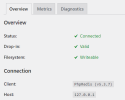
  • When you're done, check if the plugin is connected with your redis via the wordpress admin backend. See image.
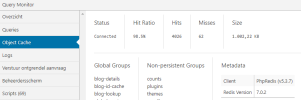
  • Confirm with the Query Monitor plugin that your queries are cached. See image.

YAML:
# docker-compose.yml
version: '2'

services:
  redis:
    container_name: myRedisContainer
    restart: always
    image: 'redis:latest'
    mem_limit: 64m
    ports:
      - "127.0.0.1:50000:6379"
    command: >
      --requirepass ChangePasswordHere

PHP:
# wp-config.php
define('WP_REDIS_HOST', '127.0.0.1');
define('WP_REDIS_PASSWORD', 'ChangePasswordHere');
define('WP_REDIS_PORT', '50000');

1657006156822.png1657006445177.png
 
i want to host wp sites too :) how you avoid get hacked ? first time using plesk i am on trial.
thanks you for your kind help
 
Back
Top