Facebook
 Twitter
tvthiel
New Pleskian
Hi,
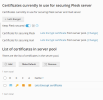
I have a server running Plesk on: h2837524.stratoserver.net and I installed a Let's Encrypt certificate for it. In the SSL/TLS Certificates management page I can see the certificate is in use for securing both Plesk and mail. But when I open Plesk in Google Chrome it tells me that the site is not secure.
Pls see attached screenshots.
Tried everything, Google keeps telling me the site is unsafe but also tells me the certificate is valid. I don't have only little ecperience working with certificate and I need some help because I don't understand what's going wrong.
Regards,
Tom...
I have a server running Plesk on: h2837524.stratoserver.net and I installed a Let's Encrypt certificate for it. In the SSL/TLS Certificates management page I can see the certificate is in use for securing both Plesk and mail. But when I open Plesk in Google Chrome it tells me that the site is not secure.
Pls see attached screenshots.
Tried everything, Google keeps telling me the site is unsafe but also tells me the certificate is valid. I don't have only little ecperience working with certificate and I need some help because I don't understand what's going wrong.
Regards,
Tom...