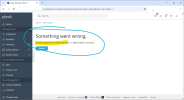
Issue Invalid argument not valid semver ('' received)

Dmytro

Regular Pleskian
Server operating system version
CloudLinux 8.10
Plesk version and microupdate number
Plesk Obsidian 18.0.77 #2
Hi. Newly installed account from WHMCS (with wordpress auto installation feature).
Before wordpress actually installed if I login into Plesk I see :
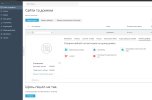
plesker1.jpg

Same error if WordPress deleted manually and not detached in WPToolkit
 
Is there any update on what's causing this problem? I've got that as well, plesk
WP Toolkit - 6.10.1-10323
Plesk - Obsidian 18.0.77 Update #2 (Web Host Edition)
 
I got the same type of error message on the WP Toolkit:
Code:
Invalid argument not valid ('7.1-alpha-62492' received)

WP Toolkit version: 6.10.1-10323
Plesk Obsidian 18.0.77 Update #5 (Web Host Edition)

How to trigger the error​

- Expanding the row of the WordPress site
- Navigating with the pagination to another page containing the WordPress site

Plesk - WP Toolkit - Error - Invalid argument not valid ('7.1-alpha-62492' received).png

Plesk Panel Log​

I typed the error message into Google and switched to AI Mode which recommend to check the logs to find and fix the offending WordPress site with the command:
Code:
tail -n 100 /var/log/plesk/panel.log

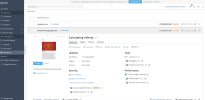
Plesk - Logs - WP Toolkit List.png

Non-SemVer version numbers​

The list entry with the name WordPress Beta and the specific version number 7.1-alpha-62492 is a clear indicator that the WP Toolkit has an issue with non-semver version numbers.

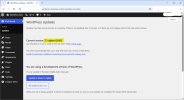
WordPress​

The WordPress admin is unaffeced and still be used.

WordPress - Updates - Version 7.1-alpha-62492.png

WP Toolkit​

Likely few users might be using alpha/beta versions of WordPress and therefore it might seem like an edge case, but if only one site has a non-semver version number the WP Toolkit becomes unusable which defeats the purpose of using it.

This issue is propably related to this article: https://support.plesk.com/hc/en-us/...-does-not-seem-to-be-a-WordPress-installation
 
Hi, @Alexander Girod . I am unable to replicate the behavior with a 7.1-alpha-62496 build. It's not the exact same built, but I would assume it should've triggered the error nevetheless:


Screenshot 2026-06-15 185525.png

If the whole WP Toolkit become unresponsive this is something our team would definitely want to look through. Could you please provide more detailed steps to reproduce? As in, did you directly install the alpha build and scanned for the instance through WP Toolkit or did you update an existing instance already present in WP Toolkit? What actions were performed tehreafter? Thanks in advance.
 
Hi, @Alexander Girod . I am unable to replicate the behavior with a 7.1-alpha-62496 build. It's not the exact same built, but I would assume it should've triggered the error nevetheless:


View attachment 29501

If the whole WP Toolkit become unresponsive this is something our team would definitely want to look through. Could you please provide more detailed steps to reproduce? As in, did you directly install the alpha build and scanned for the instance through WP Toolkit or did you update an existing instance already present in WP Toolkit? What actions were performed tehreafter? Thanks in advance.
@Sebahat.hadzhi regarding the beta version you are right, the exact version number isn't important. On my side I hade a different version number before, but I was curious if the beta build at that time was the culprit and clicked on update and got to the version in my screenshot.

The "WordPress Beta" project is an old project, which I'm only opening from time to time and it has been on that server and in the Toolset for years. I think I clicked on "Rescan" to see latest additions and changes of my WordPress websites at some point. When I stumbled upon the issue I didn't actively work with the Toolkit or even on the project. I did other things in Plesk and when I came across the WP Toolkit and wanted to navigate with the pagination to another page, the error occured. The error also gets triggered hwen I try to change the number of items per page.

As far as I remeber WordPress had non-semver version numbers in the past. Which must mean, that either early beta-builds with non-semverversion weren't an issue before or something on Plesk in relation to WordPress has changed.
 
Thank you for the confirmation. It's probably a database inconsistency and the article you linked earlier should help resolve it. Please try following the steps for the website returning the Invalid argument not valid semver error. If that solution doesn't help sorting it out, please double-check /var/log/plesk/panel.log for extension/wp-toolkit related errors.
 
Back
Top