Follow along with the video below to see how to install our site as a web app on your home screen.
Note: This feature may not be available in some browsers.
The new Python extension is now available. It allows customers to deploy and manage WSGI-based Python applications on their websites directly from Plesk.
Debian 11 has reached its end-of-life (vendor EOL date - August 31, 2026). Plesk Obsidian 18.0.81 is the last release to support it.
If you are running Plesk Obsidian on Debian 11, we recommend you upgrade those servers to Debian 12 using our dist-upgrade tool.
We plan to deprecate and remove the support for XML RPC protocol versions earlier than 1.6.9.1 in Plesk Obsidian 18.0.82. We strongly recommend that you update all existing integrations using earlier versions of the XML RPC protocol to comply with the version 1.6.9.1 specification.
I have a wordpress blog on a hosting site and they use plesk. I would like to search all directories and subdirectories for a specific file name. Is there a way to do that.
You can use the Plesk Filemanager to search for content and filenames.
It searches directories and subdirectories and shows the filenames in the results with a number: filename.txt:5
That number is the line on which the word was found.
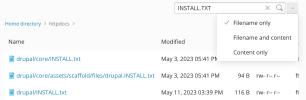
It also finds every filename that you enter in the search field when you select "Filename only":

 Facebook
 Twitter