
 Facebook
 Twitter
mikelegacy
New Pleskian
So I have a personal server still running plesk 10.4.4 on CentOS 5 (Media Temple) and I am installing a rails app on a client server (new server running Plesk 11.5 on CentOS 6.5) and when I create a new site through the "Subscriptions" panel, the output is this:
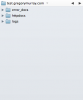
But on my server, I do the same process and the output is this:
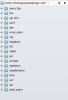
Why is his server not generating all the config, lib, conf, etc directories like when I install a new site via plesk on my server? Is this a CentOS 6 thing or a Plesk 11.5 thing?
Has anyone noticed this or can you point me in the direction of a changelog for Plesk or CentOS so that I can be assured this isn't an issue in server setup...
Sorry, this kinda stuff irks me...
But on my server, I do the same process and the output is this:
Why is his server not generating all the config, lib, conf, etc directories like when I install a new site via plesk on my server? Is this a CentOS 6 thing or a Plesk 11.5 thing?
Has anyone noticed this or can you point me in the direction of a changelog for Plesk or CentOS so that I can be assured this isn't an issue in server setup...
Sorry, this kinda stuff irks me...


