
 Facebook
 Twitter
Yogesh_Patel
New Pleskian
Hello All,
I am developing new module and installed SSL certificate using following API call.
Request call:
<packet>
<certificate>
<install>
<name>mycertificatename</name>
<webspace>mydomain.com</webspace>
<content>
<csr>csr</csr>
<pvt>private key</pvt>
<cert>cert</cert>
<ca>ca</ca>
</content>
<ip_address>domain ip address</ip_address>
</install>
</certificate>
</packet>
Response call
<packet>
<certificate>
<install>
<result>
<status>ok</status>
</result>
</install>
</certificate>
</packet>
But when i checked this domain by open in browser. the certificate is not installed.
After lots of R&D i found that there are option of select SSL in hosting setting screen. The default selected SSL is "default certificate".
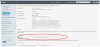
I have changed this option to "not selected".
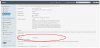
After this changes i have installed certificate again and it is working fine.
So is it bug in plesk or it is default behavior Plesk Panel?
Please give your valuable feedback.
Best Regards,
Yogesh
I am developing new module and installed SSL certificate using following API call.
Request call:
<packet>
<certificate>
<install>
<name>mycertificatename</name>
<webspace>mydomain.com</webspace>
<content>
<csr>csr</csr>
<pvt>private key</pvt>
<cert>cert</cert>
<ca>ca</ca>
</content>
<ip_address>domain ip address</ip_address>
</install>
</certificate>
</packet>
Response call
<packet>
<certificate>
<install>
<result>
<status>ok</status>
</result>
</install>
</certificate>
</packet>
But when i checked this domain by open in browser. the certificate is not installed.
After lots of R&D i found that there are option of select SSL in hosting setting screen. The default selected SSL is "default certificate".
I have changed this option to "not selected".
After this changes i have installed certificate again and it is working fine.
So is it bug in plesk or it is default behavior Plesk Panel?
Please give your valuable feedback.
Best Regards,
Yogesh


