
 Facebook
 Twitter
Hello,
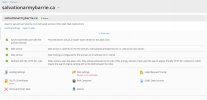
In Plesk for an alias domain 'salvationarmybarrie.ca' we noticed a following warningunder 'DNS Settings' menu - Domain is not resolvable [1]. Recently we chnaged NS records for this domain but there's already passed 2 days, so DNS propagation should be completed but problem still exists. Also we noticed that this domain doesn't still doesn't resolve from 2 places in China: DNS Checker - DNS Check Propagation Tool .
We've already checked for solution described on link Plesk shows "Domain is not resolvable" message for the domain that resolves correctly but there's no 'IPv6 address' menu there and currently only IPv4 is using on server. Could please let us know what may causes this issue and how it can be solved?
Thanks.
[1]
In Plesk for an alias domain 'salvationarmybarrie.ca' we noticed a following warningunder 'DNS Settings' menu - Domain is not resolvable [1]. Recently we chnaged NS records for this domain but there's already passed 2 days, so DNS propagation should be completed but problem still exists. Also we noticed that this domain doesn't still doesn't resolve from 2 places in China: DNS Checker - DNS Check Propagation Tool .
We've already checked for solution described on link Plesk shows "Domain is not resolvable" message for the domain that resolves correctly but there's no 'IPv6 address' menu there and currently only IPv4 is using on server. Could please let us know what may causes this issue and how it can be solved?
Thanks.
[1]


