• We value your experience with Plesk during 2026
    Please help us understand which Plesk features made your work easier this year, what is still missing and how AI should help you in Plesk ?
    Take this short 5-minutes survey. Your answers go straight into the Plesk roadmap for 2027.

Issue Joomla Toolkit - suddenly Joomla extensions updates dont work

Rob-S

New Pleskian
Server operating system version
psa v18.0.53_build1800230619.12 os_CentOS 7
Plesk version and microupdate number
Plesk Obsidian 18.0.53
Hello,

I noticed since a while that within the Joomla Toolkit view (only Joomla 4 installations) the update indicator for extensions is all good (green).

But when I open the dropdown to see more details, I see that there are some extensions which need an update?!
When I try to update them at first sight all looks good and he says they are updated - but they are not. :-(

Any hint what might be wrong?
I deleted cache, did a new search for Joomla installations and so on....nothing.

Thank you very much
Rob
 
Hello,

doesnt have anybody else the Update-Problem?
Please help as this is a major reason why am I using Joomla Toolkit at Plesk.

Joomla Toolkit (for Joomla 4 installs) is still showing that all Extensions are up to date - but when I change to the section "Extensions" there are clearly some not updated.

And the worst is that the update function within Joomla Toolkit doesnt work - no updates are installed. :-(

Please help.
Kind regards
Robert
 
It's a very specific question for a limited audience. Please consider contacting Plesk support on it so that it can be solved on your server directly.

To sign-in to support please go to https://support.plesk.com

If you experience login issues, please see this KB article:
https://support.plesk.com/hc/en-us/...rt-plesk-com-and-password-reset-does-not-work

If you bought your license from a reseller, your reseller should provide support for you. If the reseller does not provide support, here is an alternative:
https://support.plesk.com/hc/en-us/articles/12388090147095-How-to-get-support-directly-from-Plesk-
 
this has already been reported. but there is no update yet

------------
Leonid xxxxx (Plesk)
Jul 11, 2023, 07:26 CDT
Hello,

Thank you for contacting Plesk Technical Support.

Such behaviour is registered as Joomla! Toolkit bug with ID EXTPLESK-4677. Currently, no workaround is available.

Once the bug is fixed, Plesk changelog will be updated with changes.

Please let me know in case any further assistance is required.
Best regards,
Leo xxxxx
Technical Support Engineer
Plesk
------------
 
Hi!

We have another problem with joomla-toolkit, it is displayed in the tariff plans even if it is disabled, when customers try to open it, they see [Joomla! Toolkit is disabled for this tariff plan], the icon is also available in the client's menu.

Is it possible to disable the extension where it should not be?
 
I just want to bring this up again...

First of all - it is good to see, you guys are still working on the toolkit and we have now a Joomla 5 compatibility! Thanks. That's nice.

But on the other hand. For more than a year now, we are not able to update any in Joomla installed extension via the toolkit.
J3 was the last really working version of joomla, where the toolkit could manage core and extensions.

Since the toolkit product page still promotes the ability of updating extensions (while Joomla 3 isn't at the market anymore) i really, really would like to see this basic function in the toolkit again.

Come on guys - ok 12 Euro per month isn't the world... but just take mine and RobS yearly payment, buy a developer and fix it : -)

Would love to see a fully working Joomla Toolkit on Plesk.
 
...yes, would be awesome if it will be fixed - I would think it shouldn't be such an big thing and it should take another 12 month?! :rolleyes:
If I can support or test, please let me know.

Looking forward to that fix - as this is one of the major benefits for me to use this Joomla Toolkit.

Thanks and regars
Rob
 
I am not into Joomla or the toolkit so asking to understand what is required: Do you say that you'd like to have an ability of updating Joomla from one major version to another? Because the extension itself can be auto-updated.
 
@Peter Debik similar to WordPress, Joomla has the ability to extend functionality with plugins. Only with Joomla those are actually called extensions. Which is somewhat confusing in the context of Plesk.

And just like the WPT in Plesk has the ability to update plugins and themes directly from Plesk, the JTK used to have similar functionality to update Joomla extensions and themes. But this functionality has been broken in the JTK for a while unfortunately.
 
Since Joomla 4 - the joomla internal extensions (like special editor, gallery, contact-form, pagespeed, or what ever) can't be updatet by the plesk Joomla-Toolkit update function.
Since the product webpage of Joomla-Toolkit is saying, that it actually IS possible to update (Joomla-) Extenstion, it would be great to have this function again.
It already worked years ago - til today for Joomla 3.

But J4 and J5 are missing this ability in the plesk Joomla toolit.
 
Any news on that issue?

here is another explaining post from july 2023:

 
Just want to ask again... Ist almost three years since then ... and at least in my case - 60 out of 80 Joomla Instances are not able to update the Joomla-Extensions via the toolkit... (actually this is one of the most important features of the toolkit - and i am really surprised that this basic feature is still not working after so much time...)

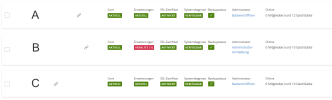
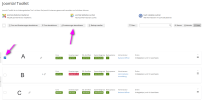
I'll try to explain it via images once again:
01.png
Instance A to C are all having extension which are outdated. Only B shows it right.
(And B can update extensions like it is supposed to do... - A and C can't.)


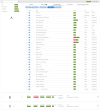
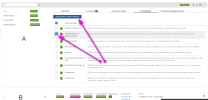
02.png
Here you can see that A has to outdated extensions as well - even if it tells differently on the left side of the section


03.png
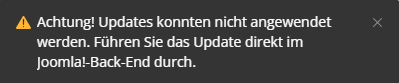
Trying to update it leads to the message:
04.png
(can't update - do it manually in the backend of joomla)


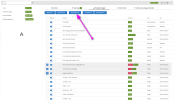
05.png
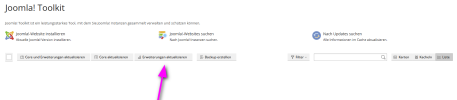
Trying to set the marker on the left of the card and using the button on the top - leads to:

(Message tells, that everything went well - but it did nothing... The extension are NOT updated - as you can see):
07.png


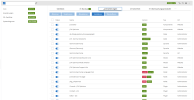
When you switch to the tab "security" - you can handle it like that:
08.png
Clicking the red marked bullet, and chosing "fix selected problems" - installs the extensions-updates finally.

So - as we can see - the Toolkit actually CAN update the extensions - but not in the way it's meant to be.

And when you manage more than two or three Joomla - instances it is really a mess, when you have to go to each instance to the security tab - wait for the toolkit to update the extensions and the going on to the next instance... So that costs easily half an hour to an hour each time... which is obviously not the purpose of this function...

i would be really glad, if there would be a fix after all those years ...

Greets.
Thilo
 

Attachments

  • 1795789549096.png
    1795789549096.png
    47.9 KB · Views: 1
Back
Top