Facebook
 Twitter
AK_learner
Basic Pleskian
- Server operating system version
- Microsoft Windows Server 2019
- Plesk version and microupdate number
- Plesk Obsidian ( Version 18.0.45 Update #2 )
Hi Pleskians,
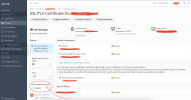
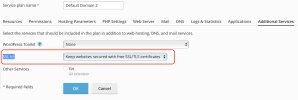
The option of "Keep websites secured" in SSL it! Extension is showing as disabled. Snapshot is attached for reference.
Kindly suggest, how to enable this option, as we do not want to re-install the SSL again and again on over 1000+ sites.
Overview of Server:
- OS: Microsoft Windows Server 2019
- Product: Plesk Obsidian ( Version 18.0.45 Update #2, last updated on July 25, 2022 03:44 AM )
- Extension SSL It! Version: 1.11.0-1509
- Mail Server Used: SmarterMail ( External - Hosted on another instance ).
The option of "Keep websites secured" in SSL it! Extension is showing as disabled. Snapshot is attached for reference.
Kindly suggest, how to enable this option, as we do not want to re-install the SSL again and again on over 1000+ sites.
Overview of Server:
- OS: Microsoft Windows Server 2019
- Product: Plesk Obsidian ( Version 18.0.45 Update #2, last updated on July 25, 2022 03:44 AM )
- Extension SSL It! Version: 1.11.0-1509
- Mail Server Used: SmarterMail ( External - Hosted on another instance ).