
 Facebook
 Twitter
CyberStorm
New Pleskian
Im running Obsidian on Ubuntu on a Lightsail instance. This morning I was unable to log in to the Plesk admin panel. I can log on but after about 2 seconds it logs me out again.
I cleared my browser cache and tested this on Chrome, Forefis and even Edge. I also tried on multiple laptops in the office - Same issue.
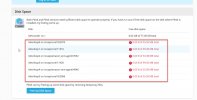
So I logged in to the repair section and freeup up some disk space. I had about 300MB free. I now have 6GB free on dev/xvda1 however I have no free space on any of the dev/loop partitions.
I'm new to Plesk and have no idea where to start to free up space on the dev/loop partitions. Can anyone point me in the right direction or assist with this?
Pic below for reference:
I cleared my browser cache and tested this on Chrome, Forefis and even Edge. I also tried on multiple laptops in the office - Same issue.
So I logged in to the repair section and freeup up some disk space. I had about 300MB free. I now have 6GB free on dev/xvda1 however I have no free space on any of the dev/loop partitions.
I'm new to Plesk and have no idea where to start to free up space on the dev/loop partitions. Can anyone point me in the right direction or assist with this?
Pic below for reference:


