
 Facebook
 Twitter
bernhardh86
Basic Pleskian
- Server operating system version
- Ubuntu 20.04
- Plesk version and microupdate number
- 18.0.42
I have done all settings in Plesk to have a daily log rotation (and keep the files 7 days).
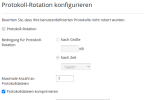
It works for the access_log and access_ssl_log (and I don't use apache at all, since I have disabled proxy mode), but i is not applied to the nginx proxy_access_ssl_log. There is always just one file of proxy_access_ssl_log.
Digging deeper, I found the file `/opt/psa/etc/logrotate.d/mydomain.at` with the settings in it:
Interesting! There is no setting for proxy_access_ssl_log. And I can't add it there, since it would be overwritten.
It works for the access_log and access_ssl_log (and I don't use apache at all, since I have disabled proxy mode), but i is not applied to the nginx proxy_access_ssl_log. There is always just one file of proxy_access_ssl_log.
Digging deeper, I found the file `/opt/psa/etc/logrotate.d/mydomain.at` with the settings in it:
#ATTENTION!
#
#DO NOT MODIFY THIS FILE BECAUSE IT WAS GENERATED AUTOMATICALLY,
#SO ALL YOUR CHANGES WILL BE LOST THE NEXT TIME THE FILE IS GENERATED.
/var/www/vhosts/system/mydomain.at/logs/*.processed {
daily
rotate 7
compress
missingok
copytruncate
}
/var/www/vhosts/system/mydomain.at/logs/error_log {
daily
rotate 7
compress
missingok
copytruncate
}
/var/www/vhosts/system/mydomain.at/logs/proxy_error_log {
daily
rotate 7
compress
missingok
copytruncate
}
Interesting! There is no setting for proxy_access_ssl_log. And I can't add it there, since it would be overwritten.
 . But now everything is clear.


