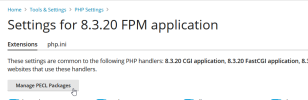
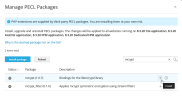
Have you found out the solution?
It is not a good idea to install mcrypt until you identify the source of the error. If you are installing Magento 2.4.x, the error is a reason to investigate the installation package or installer rather than changing the server's PHP configuration.
Which Magento version are you installing?
Which PHP version is assigned to the domain?
How are you installing Magento?
The correct solution depends on your Magento version and PHP version. So, if you are installing Magento 2.4.x, you generally should not install mcrypt to resolve this error. The extension is not a standard requirement for current Magento releases, and it was deprecated in PHP 7.1 and removed from PHP 7.2 onward.
Instead, this error may indicate that you are using an outdated Magento installer, an incompatible installation package, or an old third-party extension that checks for mcrypt.
Check the Magento version against Adobe's official requirements.
If you are using Magento 2.4.x, please check the installation package and ensure that your PHP version is compatible. Do not install mcrypt solely to pass this check.
If you are using Magento 2.3.x or earlier, confirm the specific Magento release you have and its PHP requirements. It's possible that the installer or an old dependency is checking for mcrypt.
If you are on Magento 1.x, make sure to use a compatible legacy PHP environment, as some older Magento installations require mcrypt.
If your project genuinely requires mcrypt, the solution is different. The extension was deprecated in PHP 7.1 and removed from PHP 7.2. Therefore, simply enabling it in a modern PHP configuration will not work.
If your server has multiple PHP versions installed, confirm that the temporary domain is using the PHP version supported by your Magento release.
Besides, make sure that:
The temporary domain points to the correct server.
The domain has a document root configured for the Magento installation.
The required PHP version is assigned to the domain.
A database and database user have been created.
The Magento files are uploaded to the correct directory.
The required PHP extensions and other dependencies are available.

 Facebook
 Twitter