Facebook
 Twitter
gregconway
Basic Pleskian
Hi,
I have a subscription that contains lots of mailboxes, all set to a 1 Gb limit.
One of the mailboxes is over that 1Gb limit but still receives email!
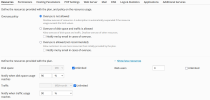
The subscription is set to no overuse, but has to be set to unlimited disk space, so the subscription is not disabled when one mailbox exceeds the 1Gb limit.
So the mailbox is > 1Gb, but the subscription does not get suspended, and the mailbox keeps receiving mail!
Any suggestions on how I could enforce the 1Gb limit per mailbox?
I'm running the latest version of Plesk (fully up-to-date) on CentOS Linux.
Thanks,
Greg.
I have a subscription that contains lots of mailboxes, all set to a 1 Gb limit.
One of the mailboxes is over that 1Gb limit but still receives email!
The subscription is set to no overuse, but has to be set to unlimited disk space, so the subscription is not disabled when one mailbox exceeds the 1Gb limit.
So the mailbox is > 1Gb, but the subscription does not get suspended, and the mailbox keeps receiving mail!
Any suggestions on how I could enforce the 1Gb limit per mailbox?
I'm running the latest version of Plesk (fully up-to-date) on CentOS Linux.
Thanks,
Greg.