• Halloween is coming! To celebrate the occasion, we dusted off a couple of old skins, and even created a brand new one (Pixel).
    To get into the festive spirit, install the Skins extension.
  • The new Python extension is now available. It allows customers to deploy and manage WSGI-based Python applications on their websites directly from Plesk.
  • The Plesk Mobile apps for iOS and Android and the Plesk Mobile Center extension have been deprecated, and are no longer available for new installations. In Plesk Obsidian 18.0.84, the Plesk Mobile Center extension will be removed from servers during the upgrade, and the Plesk Mobile apps will lose their server management features.
  • The Social Login extension has been deprecated and will be removed in Plesk Obsidian 18.0.84. After that, it will no longer be possible to log in to Plesk with a Google, Facebook, GitHub account, or with a passkey. Plesk usernames and passwords, as well as logging in with a WebPros Account, are not affected.

Question Many internal requests on image-files

pwouda

New Pleskian
Server operating system version
CentOS Linux 7.9.2009 (Core)
Plesk version and microupdate number
Plesk Obsidian v18.0.70_build1800250617.10 os_CentOS 7
Hi there,

I have about 80 Joomla-websites on my PLESK-server. On many of them (maybe all) there are a lot of requests (5 to 200 per minute) by the servers ip-addres on image-files.

I don't know why, and I guess it will overload the server for no reason.

- where do these requests come from?
- how can I stop them?

Kind regards,
Peter
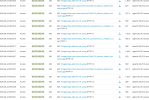
 

Attachments

  • Schermafbeelding 2025-06-24 090550.png
    Schermafbeelding 2025-06-24 090550.png
    178.2 KB · Views: 14
Hi @pwouda

A similar situation occurs with me via Cloudflare IP addresses. I think there is an indexing and when I investigated the reason, I could not figure it out yet.

The incoming requests seem to be made by bots. Although it increases the server load, bots come at a certain time and then stop indexing.

However, if you want to block it completely, I have enabled the "Under The Attack" mode via Cloudflare. Wait a few days, when I disabled the mode, the bots started scanning again.

When I query the IP address, I get the following result: ARIN Whois/RDAP

Kind regards
 
Hi @pwouda

A similar situation occurs with me via Cloudflare IP addresses. I think there is an indexing and when I investigated the reason, I could not figure it out yet.

The incoming requests seem to be made by bots. Although it increases the server load, bots come at a certain time and then stop indexing.

However, if you want to block it completely, I have enabled the "Under The Attack" mode via Cloudflare. Wait a few days, when I disabled the mode, the bots started scanning again.

When I query the IP address, I get the following result: ARIN Whois/RDAP

Kind regards
Hi Ahmet,

Thanks for the reply. The IP-addres is the address of my own server. That is the weird thing about it.

Kind regards,
Peter
 
Hi there,

After some research I found out that the request from my own server was caused by the <meta property="og:image" content="https://xxxxxxx"/> and / or the <meta name="twitter:image" content="https://xxxxxx"/> tag on the website.
That can do no harm I guess, but I am interested in the process that makes this request. Anyone?

Kind regards,
Peter
 
Back
Top