• The APS Catalog has been deprecated and removed from all Plesk Obsidian versions.
    Applications already installed from the APS Catalog will continue working. However, Plesk will no longer provide support for APS applications.
  • Please be aware: with the Plesk Obsidian 18.0.78 release, the support for the ngx_pagespeed.so module will be deprecated and removed from the sw-nginx package.

Question MariaDB upgrade via Plesk fails

mariodieck

New Pleskian
Server operating system version
Debian 12.12
Plesk version and microupdate number
Plesk Obsidian 18.0.74 Update #1
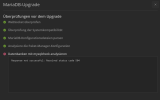
Hello everyone, my database server in Plesk is reporting a new update for MariaDB from version 10.11.14 to version 11.4, but unfortunately, the entire process fails after verification.


Checks before the upgrade:

WebSocket check: Pass
System compatibility check: Pass
Parse MariaDB configuration files: Pass
Analyze package manager configuration: Pass
Analyze databases with mysqlcheck: Error
Response not successful: Received status code 504


What could be the problem?
 

Attachments

  • Opera Momentaufnahme_2025-11-19_202733.png
    Opera Momentaufnahme_2025-11-19_202733.png
    31.4 KB · Views: 28
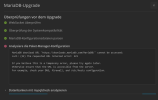
Thank you for your reply. I followed the steps below. However, I am now receiving the following error message.

Analysiere die Paket-Manager-Konfiguration
MariaDB download URL 'https://downloads.mariadb.com/MariaDB/' cannot be accessed:
curl: (22) The requested URL returned error: 521

If you believe this is a temporary error, please try again later.
Otherwise ensure that the URL is accessible from the server.
For example, check your DNS, firewall, and /etc/hosts configuration.
 

Attachments

  • mariadb.png
    mariadb.png
    41.7 KB · Views: 9
I had the same issue, it seems like MariaDB has updated their site. For now you can just manually upgrade through SSH. Since you're using Debian 12 (which is what I am using as well) this is what I did to update mine:

Bash:
MYSQL_PWD=`cat /etc/psa/.psa.shadow` mysqldump -u admin --verbose --all-databases --routines --triggers > /root/all-databases.sql
service mariadb stop
apt install apt-transport-https curl
curl -o /etc/apt/keyrings/mariadb-keyring.pgp 'https://mariadb.org/mariadb_release_signing_key.pgp'
cp -v -a /var/lib/mysql/ /var/lib/mysql_backup
curl -LsS https://r.mariadb.com/downloads/mariadb_repo_setup | sudo bash -s -- --mariadb-server-version=11.8
apt update
apt install mariadb-server
systemctl start mariadb.service
MYSQL_PWD=`cat /etc/psa/.psa.shadow` mysql_upgrade -uadmin
systemctl restart mariadb
plesk bin service_node --update local
plesk sbin packagemng -sdf

Please note of the following:
After that the database is now on 11.8 (you can change the version number to 11.4 in line 6 where it has the mariadb-server-version set).
 
Back
Top