• Debian 11 has reached its end-of-life (vendor EOL date - August 31, 2026). Plesk Obsidian 18.0.81 is the last release to support it.
    If you are running Plesk Obsidian on Debian 11, we recommend you upgrade those servers to Debian 12 using our dist-upgrade tool.
  • We plan to deprecate and remove the support for XML RPC protocol versions earlier than 1.6.9.1 in Plesk Obsidian 18.0.82. We strongly recommend that you update all existing integrations using earlier versions of the XML RPC protocol to comply with the version 1.6.9.1 specification.

Missing French Language Pack

No external LPs. All localizations are shipped with Plesk Panel 10
 
No external LPs. All localizations are shipped with Plesk Panel 10

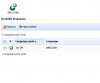
Where i choose French Language so ? I have only US or Add Local Button !

look my attachments i haven't the choose.

Thanks in advanced.

Sam
 

Attachments

  • PleskLps.jpg
    PleskLps.jpg
    20.9 KB · Views: 5
Do you have plesk-l10n package installed?

# rpm -qi plesk-l10n
........
Description :
Parallels Panel locales contains transation for
de-DE es-ES fr-FR it-IT ja-JP nl-NL ru-RU zh-CN zh-TW languages.
 
Yes I have.

But it's already installed & i dont see language in settings language.

Thanks in advanced

Sam
 
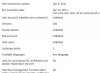
Maybe it is restricted by your license key? Did you checked it?
 
Yes i check it

all language are available.
 

Attachments

  • KeyPlesk.jpg
    KeyPlesk.jpg
    25.8 KB · Views: 5
Ok i found a solution.

From the Plesk control panel.

Login to Plesk in admin.

Click "Settings" >> "Database Hosting Preferences" >> click OK >>
"Local MySQL server" >> "Databases" tab >> "Webadmin".

Psa database

Locales Table

edit us-US & i write fr-FR

Go to settings => Langages => Select Fr-FR => Click use default

Close Plesk & it's Good
 
Back
Top