• The new Python extension is now available. It allows customers to deploy and manage WSGI-based Python applications on their websites directly from Plesk.
  • The Plesk Mobile apps for iOS and Android and the Plesk Mobile Center extension have been deprecated, and are no longer available for new installations. In Plesk Obsidian 18.0.84, the Plesk Mobile Center extension will be removed from servers during the upgrade, and the Plesk Mobile apps will lose their server management features.
  • The Social Login extension has been deprecated and will be removed in Plesk Obsidian 18.0.84. After that, it will no longer be possible to log in to Plesk with a Google, Facebook, GitHub account, or with a passkey. Plesk usernames and passwords, as well as logging in with a WebPros Account, are not affected.

Missing French Language Pack

No external LPs. All localizations are shipped with Plesk Panel 10
 
No external LPs. All localizations are shipped with Plesk Panel 10

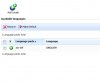
Where i choose French Language so ? I have only US or Add Local Button !

look my attachments i haven't the choose.

Thanks in advanced.

Sam
 

Attachments

  • PleskLps.jpg
    PleskLps.jpg
    20.9 KB · Views: 5
Do you have plesk-l10n package installed?

# rpm -qi plesk-l10n
........
Description :
Parallels Panel locales contains transation for
de-DE es-ES fr-FR it-IT ja-JP nl-NL ru-RU zh-CN zh-TW languages.
 
Yes I have.

But it's already installed & i dont see language in settings language.

Thanks in advanced

Sam
 
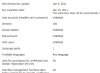
Maybe it is restricted by your license key? Did you checked it?
 
Yes i check it

all language are available.
 

Attachments

  • KeyPlesk.jpg
    KeyPlesk.jpg
    25.8 KB · Views: 5
Ok i found a solution.

From the Plesk control panel.

Login to Plesk in admin.

Click "Settings" >> "Database Hosting Preferences" >> click OK >>
"Local MySQL server" >> "Databases" tab >> "Webadmin".

Psa database

Locales Table

edit us-US & i write fr-FR

Go to settings => Langages => Select Fr-FR => Click use default

Close Plesk & it's Good
 
Back
Top