• Halloween is coming! To celebrate the occasion, we dusted off a couple of old skins, and even created a brand new one (Pixel).
    To get into the festive spirit, install the Skins extension.
  • The new Python extension is now available. It allows customers to deploy and manage WSGI-based Python applications on their websites directly from Plesk.
  • The Plesk Mobile apps for iOS and Android and the Plesk Mobile Center extension have been deprecated, and are no longer available for new installations. In Plesk Obsidian 18.0.84, the Plesk Mobile Center extension will be removed from servers during the upgrade, and the Plesk Mobile apps will lose their server management features.
  • The Social Login extension has been deprecated and will be removed in Plesk Obsidian 18.0.84. After that, it will no longer be possible to log in to Plesk with a Google, Facebook, GitHub account, or with a passkey. Plesk usernames and passwords, as well as logging in with a WebPros Account, are not affected.

Issue ModSecurity : collections_remove_stale: Failed deleting collection

Marc D.

New Pleskian
Hello,

With mod_security enabled (in detection mode only, in conjunction with fail2ban) we've got a lot of errors of this type :
"collections_remove_stale: Failed deleting collection (name "ip", key "xxxxx"): Internal error (specific information not available) Apache-Error: [file "apache2_util.c"] [line 271] [level 3] [client xxxx] ModSecurity: collections_remove_stale: Failed deleting collection (name "ip", key "xxxxx"): Internal error (specific information not available)"

I tried to truncate the /var/cache/modsecurity/www-data-ip.pag file (was 500 Mb) and re-started modsecurity but the problem persists.

The errors are treated as false positives by fail2ban.

Is there a way to solve this problem ?

btw, where are the configuration files located ?

Thanks in advance for your help

Marc
 
It is related to the known Plesk bug PPPM-11961.
As a workaround, apply either of the following solutions:
1. Login to Plesk
2. Go to Tools & Settings > IP Address Banning (Fail2Ban) > Trusted IP Addresses and click Add trusted IP
3. Type the IP address and click OK.
 
Thank you much for your answer.

I don't think this problem is related to rules 210710 and 214930 that are already disabled in my case.
I already whitelisted some IPs of my customer, but I can't add all my customer IP addresses.

The problem occurs several times a day on all websites (WordPress, Drupal, Symfony, ...) and is not specific to a rule.
Here is an example of error message occurred on a legitimate access (unless I miss something) :


Code:
--10cc7a05-A--
[07/Sep/2021:14:13:51 +0200] YTdXfwbgfhL6gdeCv5CdcwAAAAE 176.157.135.121 35286 46.105.44.87 7081
--10cc7a05-B--
GET /themes/custom/somalu_theme/node_modules/bootstrap-sass/assets/javascripts/bootstrap/tooltip.js?qytklw HTTP/1.0
Host: www.somalu.com
X-Real-IP: 176.157.135.121
X-Accel-Internal: /internal-nginx-static-location
Connection: close
sec-ch-ua: "Chromium";v="92", " Not A;Brand";v="99", "Google Chrome";v="92"
sec-ch-ua-mobile: ?0
user-agent: Mozilla/5.0 (Windows NT 10.0; Win64; x64) AppleWebKit/537.36 (KHTML, like Gecko) Chrome/92.0.4515.159 Safari/537.36
accept: application/signed-exchange;v=b3;q=0.9,*/*;q=0.8
purpose: prefetch
sec-fetch-site: same-origin
sec-fetch-mode: no-cors
sec-fetch-dest: script
referer: https://www.somalu.com/
accept-encoding: gzip, deflate, br
accept-language: fr-FR,fr;q=0.9,en-US;q=0.8,en;q=0.7

--10cc7a05-F--
HTTP/1.1 200 OK
X-Content-Type-Options: nosniff
Upgrade: h2,h2c
Connection: Upgrade, close
X-Accel-Version: 0.01
X-Accel-Redirect: /internal-nginx-static-location/themes/custom/somalu_theme/node_modules/bootstrap-sass/assets/javascripts/bootstrap/tooltip.js
Cache-Control: max-age=1209600
Expires: Tue, 21 Sep 2021 12:13:51 GMT
Content-Length: 0
Content-Type: application/javascript

--10cc7a05-H--
Message: collections_remove_stale: Failed deleting collection (name "ip", key "185.49.20.76_aa6b92822cd5e8bc79f4f753be2ac256ed1a542c"): Internal error (specific information not available)
Apache-Error: [file "apache2_util.c"] [line 271] [level 3] [client 176.157.135.121] ModSecurity: collections_remove_stale: Failed deleting collection (name "ip", key "185.49.20.76_aa6b92822cd5e8bc79f4f753be2ac256ed1a542c"): Internal error (specific information not available) [hostname "www.somalu.com"] [uri "/themes/custom/somalu_theme/node_modules/bootstrap-sass/assets/javascripts/bootstrap/tooltip.js"] [unique_id "YTdXfwbgfhL6gdeCv5CdcwAAAAE"]
Stopwatch: 1631016831835114 64186 (- - -)
Stopwatch2: 1631016831835114 64186; combined=122436, p1=381, p2=2120, p3=24, p4=32, p5=59967, sr=88, sw=0, l=0, gc=59912
Producer: ModSecurity for Apache/2.9.3 (http://www.modsecurity.org/); CWAF_Apache.
Server: Apache
Engine-Mode: "DETECTION_ONLY"

I guess the problem is related to the persistent collections management by modsecurity (PB while accessing the DBM file that holds collections)

btw: Do you know where is the main modsecurity configuration file located in Plesk ?

Thanks again
Marc
 
Hello,

Same problem here. Modsecurity errors like "Message: collections_remove_stale: Failed deleting collection (name "ip", key "46.101.95.65_1759fce451e56b4eb624eea72c06ca78e73f27d0"): Internal error (specific information not available)" cause fail2ban to ban legit IPs.

I had no luck searching how to fix the deleting collections error in modsecurity.

I'll stay tuned hoping for a solution.

Warm regards,
Jesús Ángel.
 
I'm encountering a huge jump in this error in my logs today for unknown reasons. Since it seems fixing the logging of this condition in modsec.log is unlikely, it seems maybe a workaround would be to figure out how to ignore it in the fail2ban filter. I'm not an expert on that, but would welcome any input from someone confident in how to modify the default fail2ban filter below.
```
[Definition]
failregex = ^(?:\[.*?\]\s\S*|X-Real-IP:)\s<HOST>\s
ignoreregex = ^\[.*?\]\s\S*\s<HOST>\s.*\s\1
```
 
I found this page that explains it :

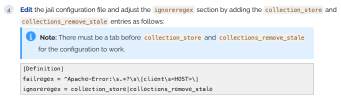
You need to edit the file /etc/fail2ban/filter.d/plesk-modsecurity.conf
and add these two lines :
collection_store
collections_remove_stale
under the line
ignoreregex = ^\[.*?\]\s\S*\s<HOST>\s.*\s\1
 
This does not work for me on CentOS 7.9 TuxCare, Plesk Obsidian 18.0.79. In the UI, Manage Filters, plesk-modsecurity I tried (with tabs) and restarted fail2ban.

Code:
[Definition]
failregex = ^(?:\[.*?\]\s\S*)\s<HOST>\s
ignoreregex = ^\[.*?\]\s\S*\s<HOST>\s.*\s\1
    collection_store
    collections_remove_stale

Also the cited article appears to have conflicts: https://support.plesk.com/hc/en-us/...che-default-SESSION-Resource-deadlock-avoided

Firstly, the notice in step 4 "There must be a tab ..." does not make sense to me with the subsequently supplied code, which is completely different to the above.

1785155469862.png
Regardless, if I run fail2ban-regex /var/log/modsec_audit.log '^Apache-Error:\s.*?\s\[client\s<HOST>\]' it returns Failregex: 0 total. Actual total is 200+.

Secondly, it assumes /var/log/modsec_audit.log will output [client followed by an IP address. My audit logs do not seem to include the [client info part anywhere. I have X-Real-IP: on a different line in section B, and the IP is mentioned in section A too.

Thirdly, there are no datetimes on the Apache-Error line in my audit logs. From what I can see in the Plesk-supplied /etc/fail2ban/filter.d/*.conf filters and /etc/fail2ban/jail.d/plesk.conf, it appears not to be set up to parse multiple lines.

Lastly, it appears even if it does work for some, an attacker could potentially inject the phrases collection_store collections_remove_stale into their request for a successful ignore.

I'd add collection_retrieve_ex too which was a failure in my log today causing a false positive.

So, is that article suggesting a potentially unsafe solution offering a false sense of security?

And could someone help me understand why we are parsing the complex /var/log/modsec_audit.log and not /var/www/vhosts/system/*/logs/error_log which seems to output everything needed to capture/ignore on one line per entry.
 
Still present on Plesk Obsidian 18.0.81 (AlmaLinux 8.10, Apache prefork, mod_security 2.9.14-2 Plesk build, fail2ban 1.1.1, Comodo free ruleset, SecCollectionTimeout 600 already set). Legitimate visitors are still being banned by the plesk-modsecurity jail. Sharing what we measured, in case it helps Plesk (PPPM-11961) and other admins.

What we found (30 days of audit logs, about 99,600 audited transactions):
- 1,270 transactions were audit-logged with only "collections_remove_stale: Failed deleting collection (name "ip" ...): Internal error" and no rule ID. Most were normal requests answered with HTTP 200.
- About 35 IPs a month were banned only because of these entries. One of our customers was banned five times in a week while just browsing their own site.
- The chain: ModSecurity logs this internal error at level 1, which marks the transaction as relevant, so SecAuditEngine RelevantOnly writes it to modsec_audit.log. The stock filter (/etc/fail2ban/filter.d/plesk-modsecurity.conf) matches any audit header, without requiring a rule match. Pages with many images produce several such entries within a second, which crosses maxretry=3 at once.
- "Internal error" is APR_EGENERAL from apr_sdbm_delete, which means the record was already gone when ModSecurity tried to delete it. That points to concurrent cleanup runs deleting the same expired record.
- Cleanup runs are not independent. Requests arriving within 5 ms of a request that ran cleanup also ran it 81.7% of the time, against 0.02% otherwise (the overall rate is about 1%). This looks like the old correlated-GC bug (Red Hat bug 1388656), still present in this build.
- Each cleanup run is slow because the ip.pag file is huge but almost empty: 646 MB logical (661,395 pages), with only 37 pages holding data. Each run took 1 to 8 seconds, which makes collisions likely.

Workaround that worked for us: a .local override that only counts transactions containing a real rule ID. Plesk updates replace only the .conf, so the .local should survive them. Create /etc/fail2ban/filter.d/plesk-modsecurity.local with:

Code:
[Init]
maxlines = 100

[Definition]
failregex = ^[[^]]+]\s\S+\s<HOST>\s\d+\s\S+\s\d+\s*\n(?:(?!--[0-9a-f]+-Z--).\n

Then run: fail2ban-client reload plesk-modsecurity

Verify with: fail2ban-client get plesk-modsecurity maxlines (should print 100)

Trade-offs: a rule hit more than 100 lines below the transaction header is missed. That only happens when the response body is logged, about 0.3% of banned IPs for us. Also, the first
match after a reload logs a harmless "Match without a timestamp" warning. I woorkaround suggested earlier in this thread: an attacker can put that text intotheir own requests to avoid being banned. This filter requires a positive rule match instead.

Plesk team: the real fix is on your side. Either build mod_security with LOG_NGLOBAL_COLLECTION_LOCK), or ship a filter that requires a rule ID. Please share the status of PPPM-11961.
 
Back
Top