• Halloween is coming! To celebrate the occasion, we dusted off a couple of old skins, and even created a brand new one (Pixel).
    To get into the festive spirit, install the Skins extension.
  • The new Python extension is now available. It allows customers to deploy and manage WSGI-based Python applications on their websites directly from Plesk.
  • The Plesk Mobile apps for iOS and Android and the Plesk Mobile Center extension have been deprecated, and are no longer available for new installations. In Plesk Obsidian 18.0.84, the Plesk Mobile Center extension will be removed from servers during the upgrade, and the Plesk Mobile apps will lose their server management features.
  • The Social Login extension has been deprecated and will be removed in Plesk Obsidian 18.0.84. After that, it will no longer be possible to log in to Plesk with a Google, Facebook, GitHub account, or with a passkey. Plesk usernames and passwords, as well as logging in with a WebPros Account, are not affected.

Question More easy MariaDB Upgrade?

Harry Luijk

New Pleskian
Server operating system version
CentOS Linux 7.9.2009 (Core)
Plesk version and microupdate number
Plesk Obsidian 18.0.61 Update #5
Dear People,

Happy with the new tool in PLESK MariaDB Upgrade.... long waited for...

Snapshot VPS is created at ARGEWEB via portal.

But get this. Very unfortunate. Who can help for a moment? Is a small thing but I am not a LINUX guy.... please see the picture attached.

Is there a clear instruction? To be provided in the new tool. TY.

<removed personal information>
 

Attachments
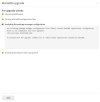
  • MariaDB upgrade 10.2.44 via PLESK NEW tool.jpg
    MariaDB upgrade 10.2.44 via PLESK NEW tool.jpg
    64.8 KB · Views: 11
Last edited by a moderator:
You can try the following:
1. Connect to the server via SSH;
2. Move out the reported repository file using the following command mv /etc/yum.repos.d/MariaDB.repo /root/
3. Start the upgrade process again.
 
Back
Top