Question Need clarification on quota management in service plan

Thomas Oryon

Regular Pleskian
Hello Support,

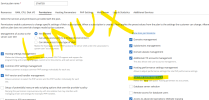
We have both Plesk Linux & Windows server and while creating the service plan there is an below option available based on Linux & windows

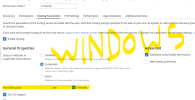
Hard disk quota assignment - Linux
Hard disk quota - Windows

Can I check what is the use of this feature and how this works on both environment?

Awaiting your reply.
 

Attachments

  • Lin - service plan.png
    Lin - service plan.png
    136.5 KB · Views: 2
  • Win - service plan.png
    Win - service plan.png
    87.7 KB · Views: 2
It's pretty self explanatory, it adds a limit to how much space a subscription can use so it doesn't use up all the space on the drive that stores the site files. I'm not 100% sure how it applies on Linux since I never used it but I know on Windows it's using the built in quota feature that Windows has.
 
Both Windows and Linux allow you (as the administrator) to set a hard disk quota for subscriptions. Once the quota limit has been reached, no more files can be added to the hosting webspace of a subscription. The quota only applies to the hosting webspace, not to email or databases. Those don't count towards the quota either.

For both the quota can ben set on the "Hosting Parameters" tab of a service plan. Enabling the "Hard disk quota assignment" permission option on the "Permissions" tab of a service plan allows customers to modify the subscription quota.

More information can be found here:
 
Last edited:
Hello @Kaspar ,

How can we verify that the hard limit quota setup for the domain name or account in the server backend for both linux and Windows server. We can see this in Subscription, how to verify the hard limit quota setup for the domain names in backend?

Awaiting your reply.
 
If you want to test the hard disk quota for a subscription to verify if it's working, just set a quota for the service plan (or the subscription) and upload a files to the webspace larger then the quota. It should get rejected.
 
Back
Top