Follow along with the video below to see how to install our site as a web app on your home screen.
Note: This feature may not be available in some browsers.
The APS Catalog has been deprecated and removed from all Plesk Obsidian versions. Applications already installed from the APS Catalog will continue working. However, Plesk will no longer provide support for APS applications.
Please be aware: with the Plesk Obsidian 18.0.78 release, the support for the ngx_pagespeed.so module will be deprecated and removed from the sw-nginx package.
If I want to do a new installation in Linux.
Is it just enough to delete vhosts folder with all the subfolders in it before I do a new installation or do I need to ask my provider to reinstall the whole VPS with Linux and everything ?
That looks easy.
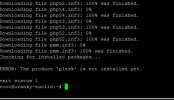
However I got an error. Look at the attached image.
I used the command : plesk installer --remove-everything
Ans Plesk is still there.
When I first installed Plesk it was under
/var/www/vhosts/....
Then I wanted to move it to another HDD mounted as disk2
I used a script/procedure from support and moved it to
/disk2/
But I see now that the files are directly under disk2 and not disk2/vhosts/......
Maybe that is the problem ?
It is not the location of Plesk itself. It is location of vhosts, files of hosted websites and generally, it does not affect Plesk installation/uninstallation.
Hmm...not sure I follow you here Igor.
I haven't tried to uninstall anything except from the command you pointed me to.
Plesk is still installed and working.
However the folders at /var/www/vhosts (my old path) are stille there. But they are empty. Would that be the reason for "Plesk is not installed" ?
Do I need to specify that plesk is under /disk2/ ???